
 Español
  Français
  Português
  Italiano
 Xiaomi Watch S4 41mm Review
A premium-feeling watch from Xiaomi for smaller wrists and excellent health and activity tracking.
Ratings are contextual to quality band. A 4-star ultra-budget watch and a 4-star midrange watch offer different value propositions.
✓ Pros
- Excellent build quality and design
- Beautiful AMOLED display
- Fluid HyperOS 3 experience
- Good sensors and health monitoring
- Fast charging
✗ Cons
- Weak urban GNSS accuracy
- Automatic brightness is too dim indoors
- Limited notification support
- Unreliable deep sleep detection
- Restricted NFC payment ecosystem
Specifications
- Release Date
- Q3 2025
- Approximate price (December 2025)
- £129.99 / $189.99 / €159.99 (December 2025, non-gold variant)
- Price premium (gold variant)
- £207 / $207 / €207 (December 2025)
- Display
- 1.32-inch AMOLED, 466x466, 60Hz, 1500 nits
- App
- Mi Fitness
- Operating System
- HyperOS 3
- Review firmware version
- v3.2.76
- Processor
- Xring T1 chip
- Heart rate sensor
- 4-LED + 4PD sensor
- SpO2 sensor
- 4-LED + 4PD sensor
- Temperature sensor
- High-precision skin temperature sensor
- GNSS
- L1+L5 dual band. GPS, Galileo, Glonass, BeiDou, QZSS
- Battery capacity
- 320 mAh
- Battery life
-
- Advertised: Up to 8 days
- Review: 4 days
- Heavy usage / AOD: 2 days
- Water Resistance
- 5 ATM
- Bluetooth version
- 5.4
- Weight without strap
- 32 g
- Weight with included fluororubber strap
- 45 g
- Dimensions
- 41.2 × 9.5 mm
- Watch band type
- Standard 18mm lug width
- Features
-
- Heart rate
- Heart rate broadcast
- SpO2
- Sleep tracking
- Stress tracking
- Step counter
- GNSS activity tracking
- NFC payments
- Compass
- Fall detection
- Emergency SOS
- Emergency location sharing
- Thermometer
- Barometer
- Barometric altimeter
- Breathing exercises
- Menstrual cycle tracking
- Bluetooth calling
- Phone notifications
- Weather forecast
- Phone music control
- Camera shutter
- Dictation
- Tasks
- Timers
- Stopwatch
- Alarms
Disclaimer
Xiaomi provided this device for free for review purposes. This did not influence my opinion or the content of this review, and Xiaomi had no input before or after publication.
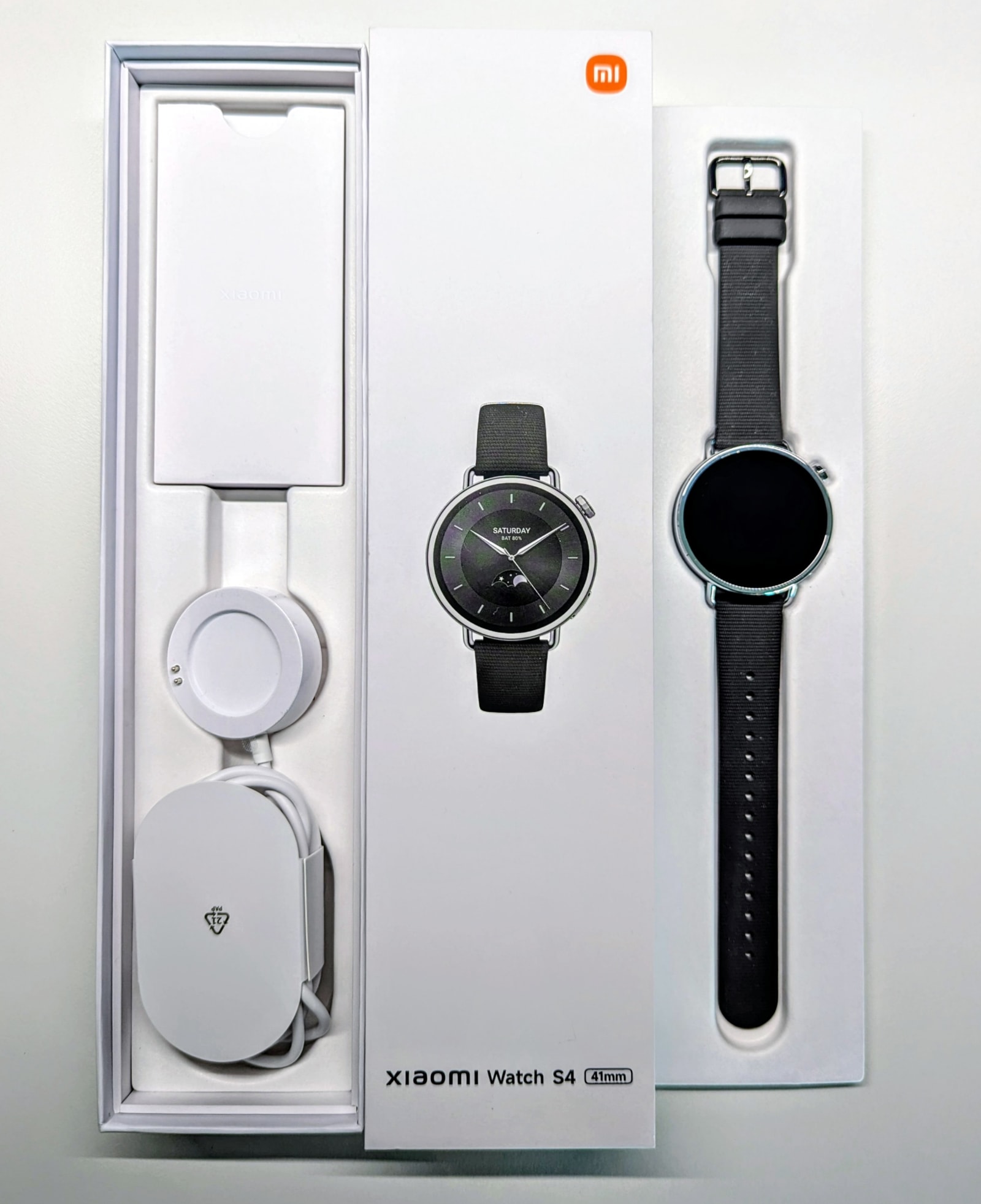
Box contents
Inside the box, you’ll find the watch, the strap, a charging cable, and the manual.
Design and Build Quality
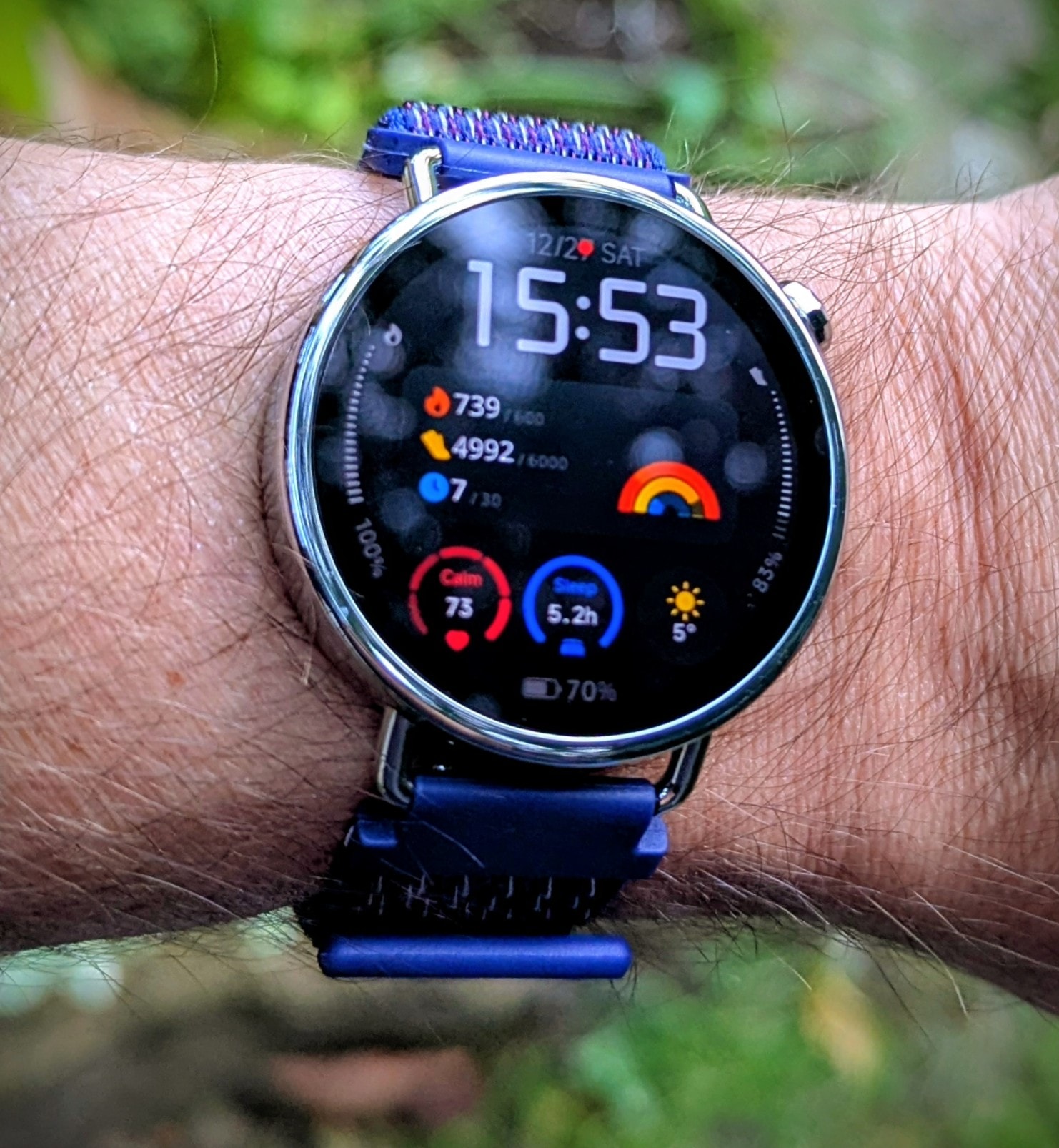
The Xiaomi Watch S4 41mm is a compact, lightweight smartwatch featuring a glossy stainless steel body and mid-frame, paired with a polycarbonate back. The heart-rate sensor is housed under a smooth acrylic window. Build quality is excellent for the price, with tight seams and precise alignment throughout.
Despite its solid construction, the watch wears lightly and is easy to forget on the wrist. The included fluororubber strap is comfortable and flexible; however, at 18mm wide, it felt a bit narrow for my preference, so I replaced it with a wider nylon-velcro strap.
The back panel sports the charging port and a prominent heart-rate sensor pod, which features eight individual lenses for its four LEDs and four photodiodes. While it’s comfortable against the skin, the sensor bulge’s sharp corners tend to accumulate dirt over time.
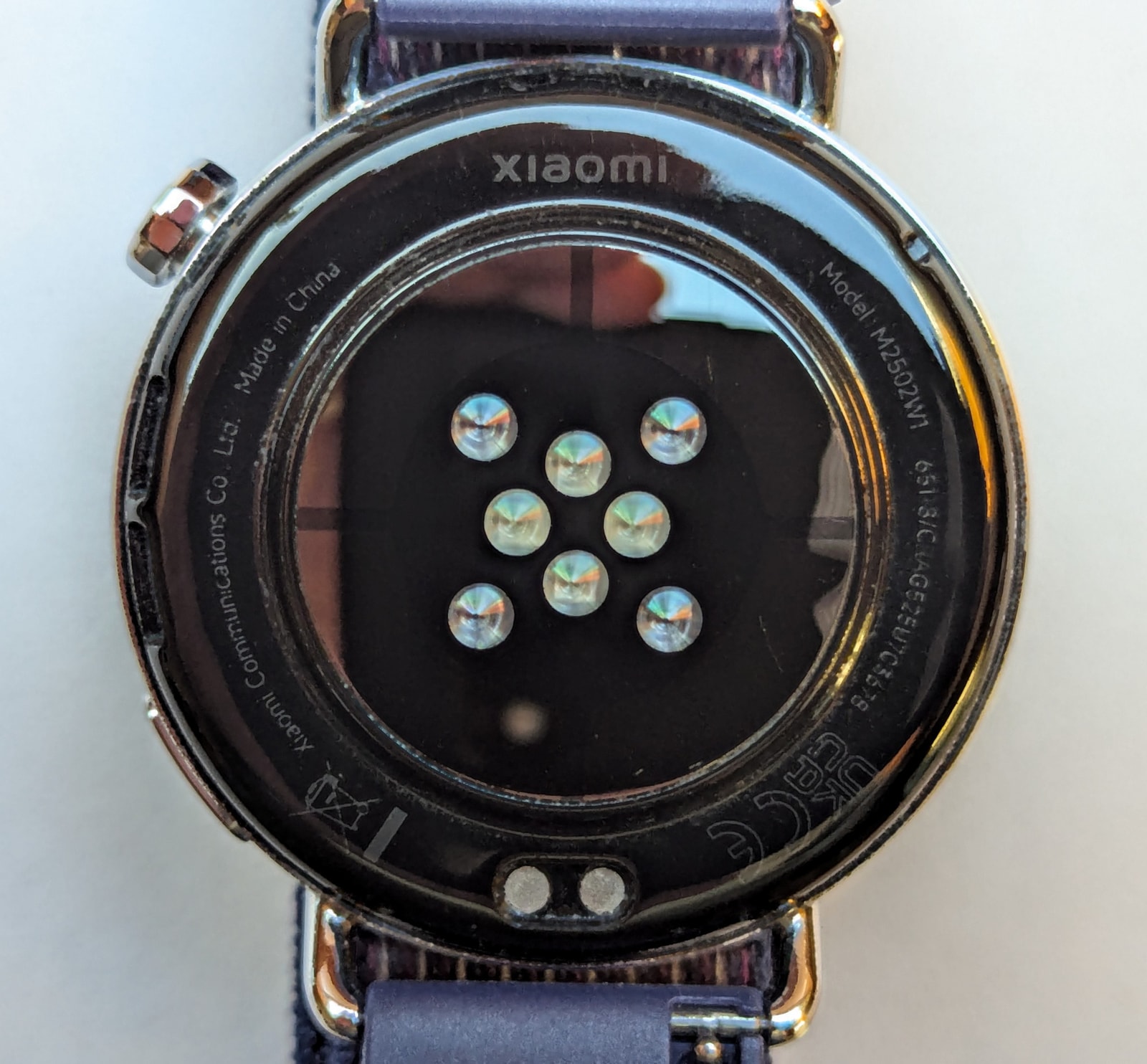
The right side houses a speaker and two buttons: a rotating crown and a secondary action button. The crown features a glass or stone inlay - black on our review unit - giving it a sophisticated, jewel-like appearance.
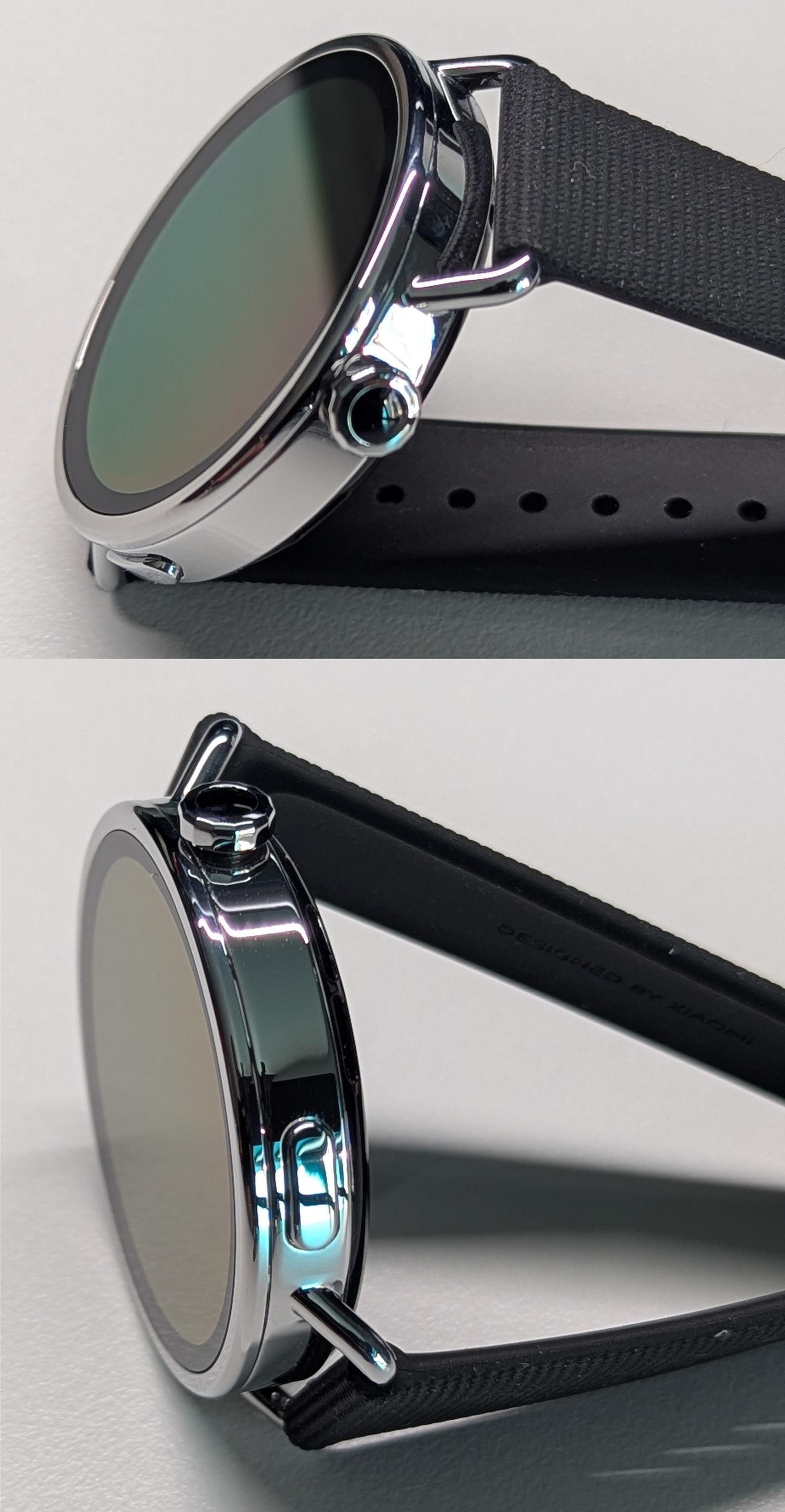
The strap lugs are shaped like handles, a stylish touch that emphasizes the watch’s elegant design. While this can make fitting some third-party straps slightly challenging, the overall aesthetic is versatile. Although clearly influenced by a more classic feminine design language, it looks smart even on larger wrists. The combination of lightweight materials and robust assembly ensures the watch feels solid and premium, easily rivaling competitors at twice the price.
Display
The watch features a 1.32-inch AMOLED panel with a resolution of 466x466 pixels. It’s an absolutely gorgeous display with a pixel density of 352 ppi - the photos just don’t do it justice. The bezel is relatively narrow, at just a couple of millimeters wide.
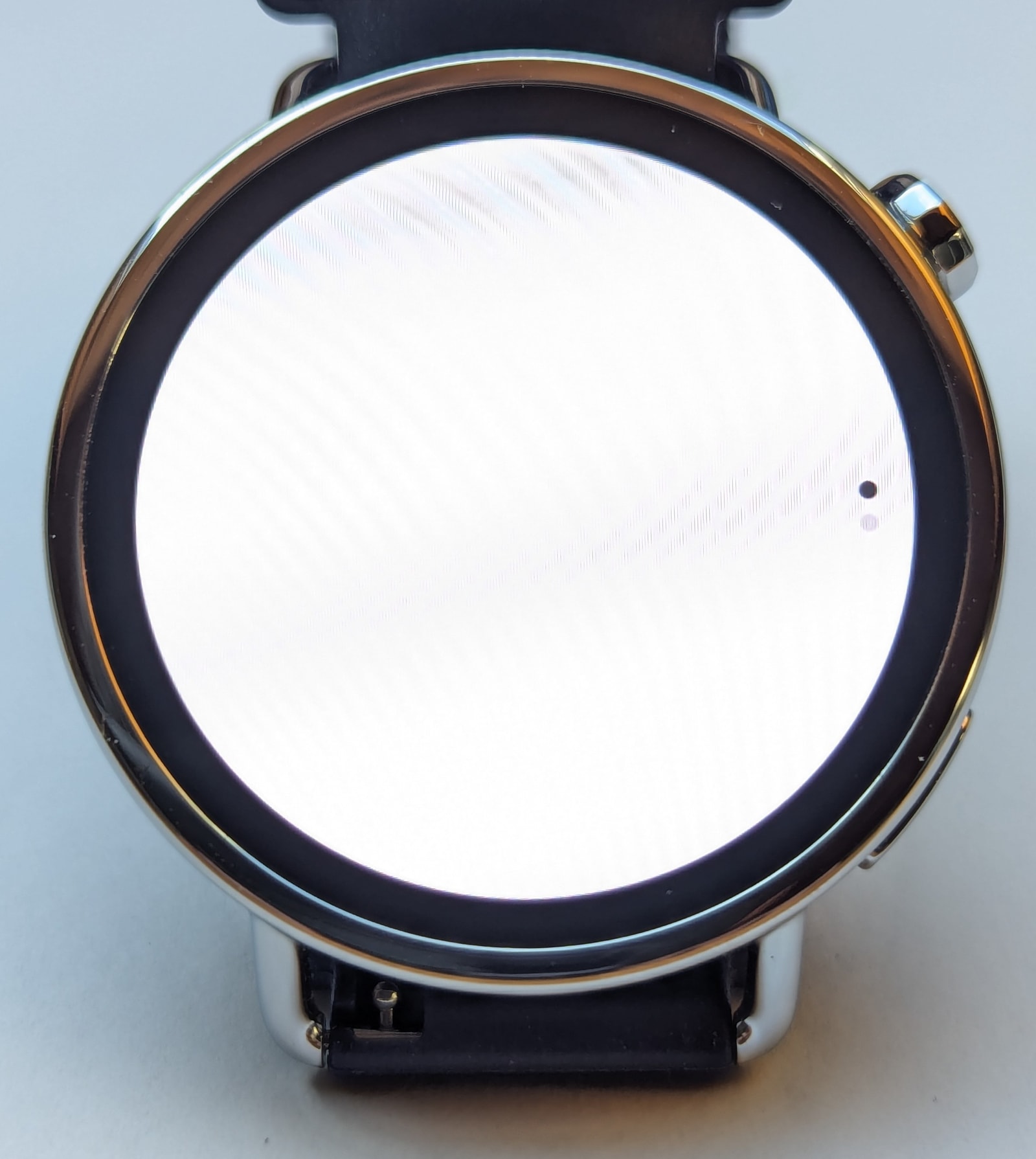
Xiaomi doesn’t disclose the glass material, so it could be anything, really, but I’d be surprised if it’s not some kind of Gorilla Glass - after three weeks of daily wear, it hasn’t picked up any scratches yet.
At 1500 nits peak brightness and with auto-brightness enabled, the screen is easily viewable outdoors; indeed, the display remains visible even through polarised sunglasses. There’s one caveat here: the automatic brightness curve is extremely conservative indoors, to the point that the screen is often too dark to read when light sources are indirect. Compounding the problem, the quick settings menu does not have a brightness control, so one needs to go into the display settings to adjust it manually if needed.
Watch interface
The watch is furnished with Xiaomi’s own proprietary OS, HyperOS 3. It’s a very modern, visually elegant system with silky-smooth animations (60Hz refresh rate) and thoughtful interface choices. If you’ve used other Bluetooth-powered smartwatches before, you’ll be familiar with the various watch face mechanisms and general navigation interface.
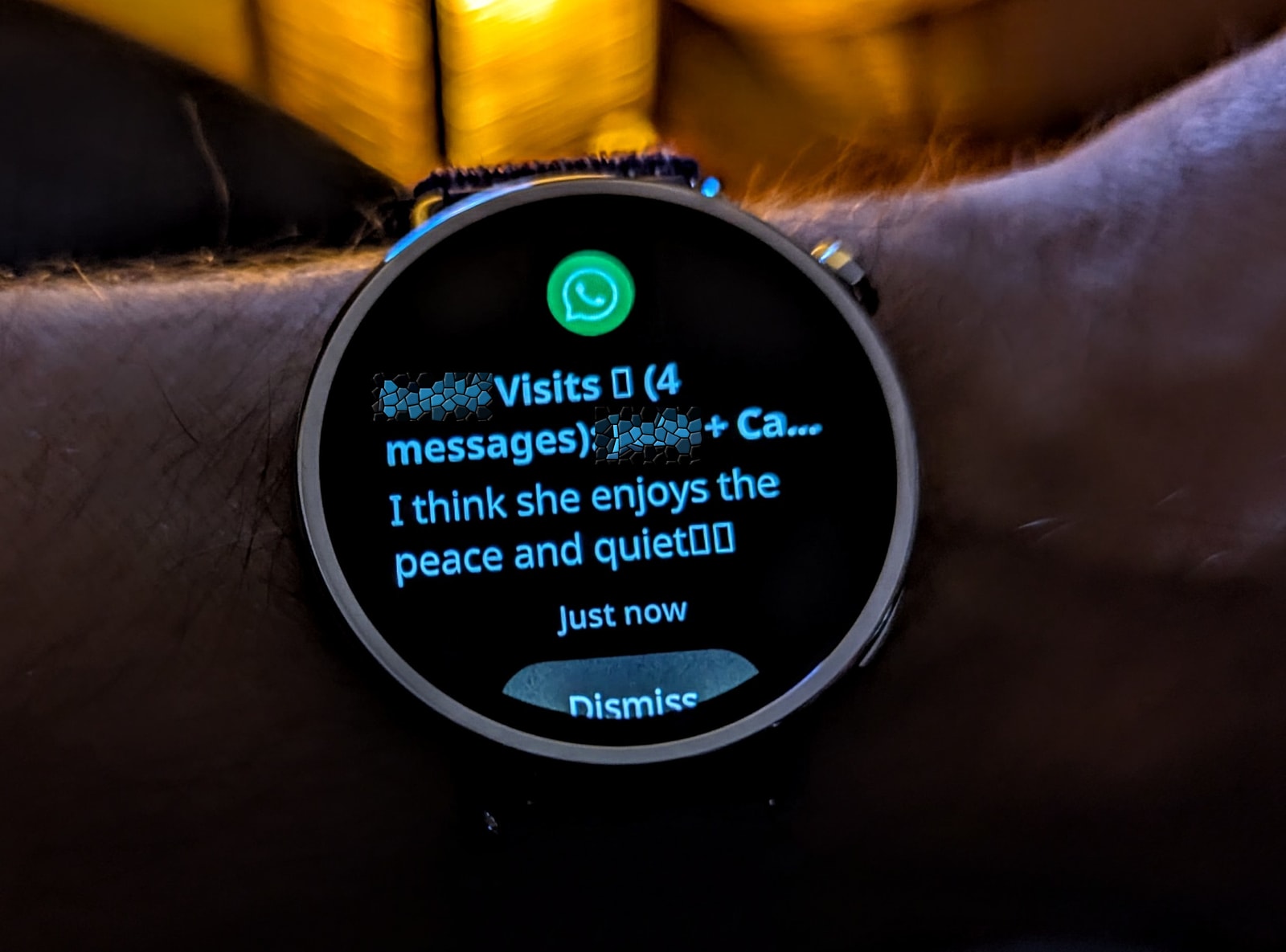
Swiping down, or rotating the crown anti-clockwise, brings up the notifications list. These simply mirror your phone’s notifications. You can select which apps can send alerts to the watch from the Mi Fitness app. Dismissing notifications will also dismiss them on your phone, but that’s as far as notification integration goes - it’s not possible to respond to messages and there is no emoji support either, so any incoming messages will be displayed as plain text with squares instead of emojis. This is disappointing, considering just how polished the watch’s HyperOS firmware is. It seems to be a software limitation, since the hardware and software are more than capable of supporting richer notification features.
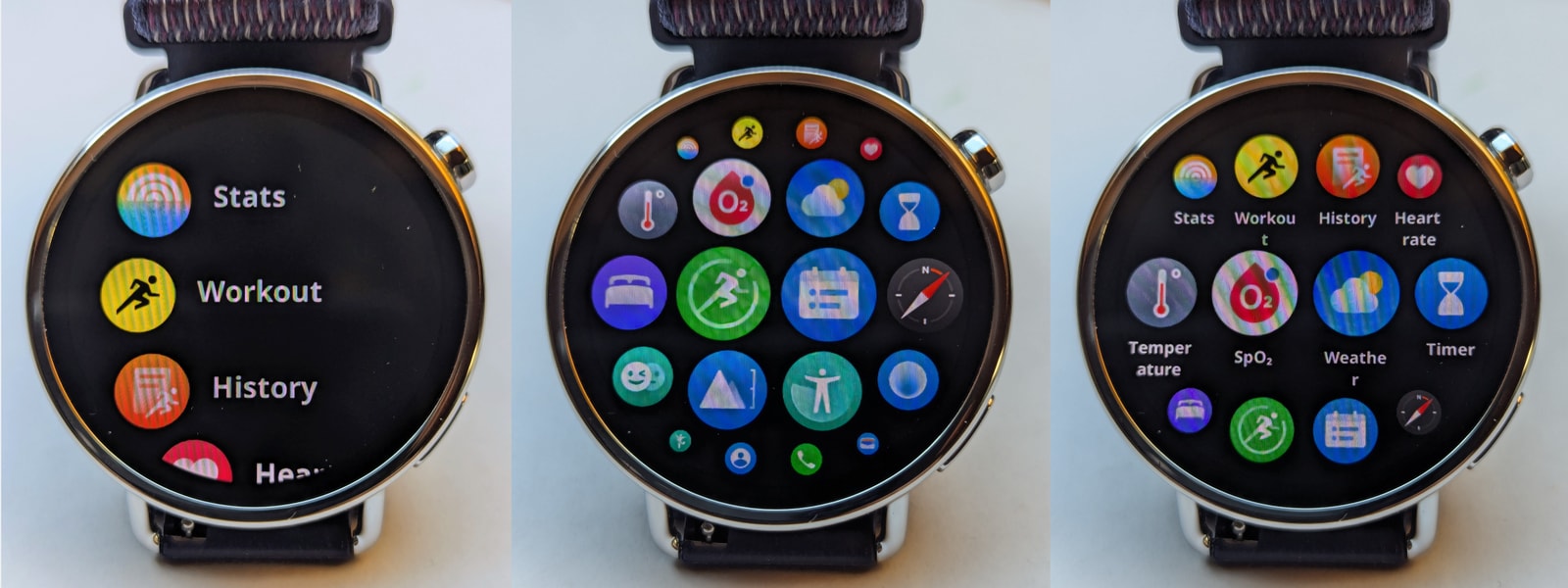
Swiping up, or rotating the crown clockwise, opens the cards view. Whenever I use smartwatches that have this feature, it quickly becomes my preferred application access point, but in this case, the list of available cards is unfortunately on the short side and it can’t be customised: daily activity, heart rate, weather, and sleep. Scrolling further takes you to the list of apps (see below).
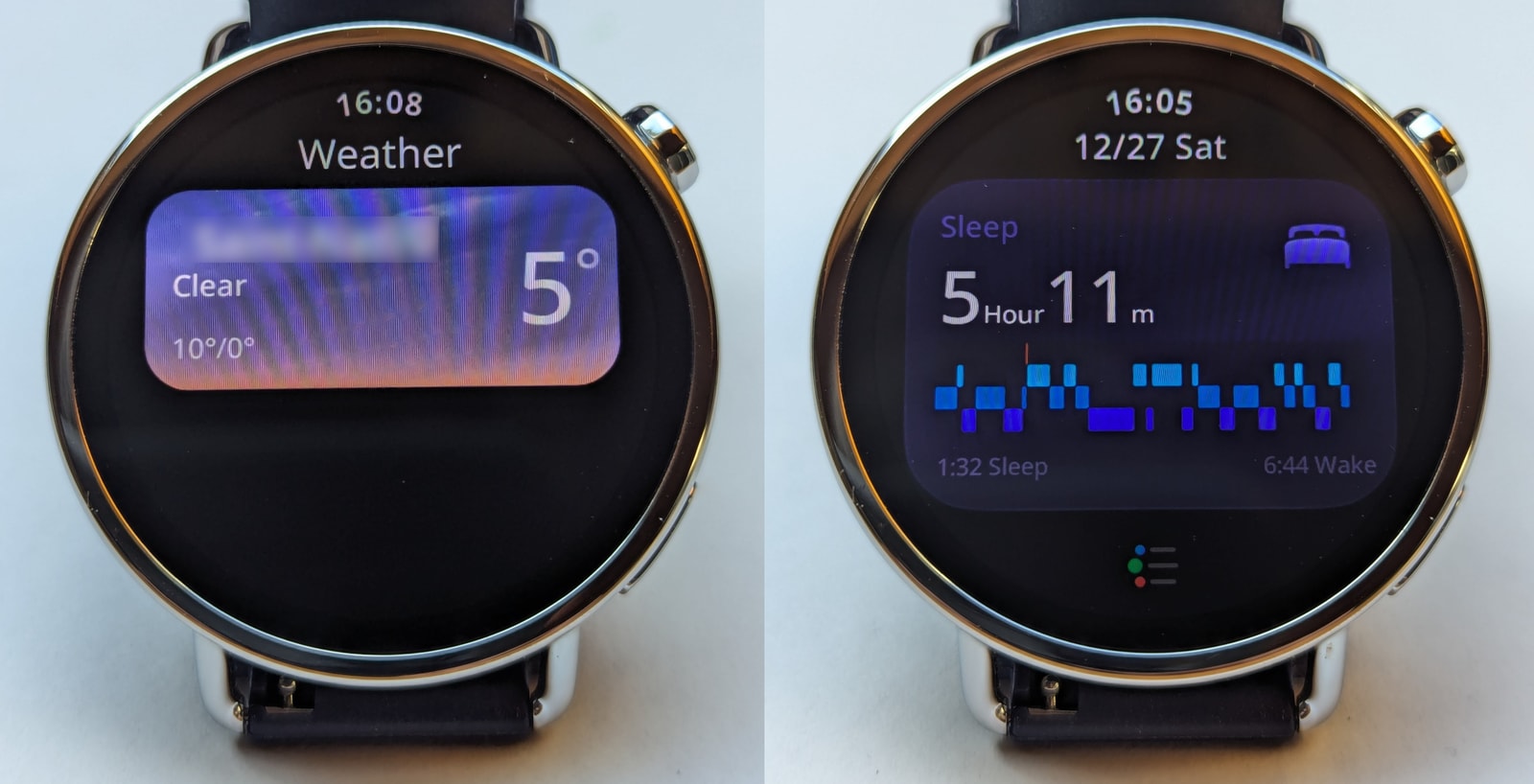
Swiping right, surprisingly, is not bound to any particular action, and swiping left brings up the watch face selection menu (more on that below). This is quite different from what seems to be the norm on other smartwatch systems, but it’s easy to get used to.
Buttons:
- Crown: The crown action is incredibly smooth, and the system responds very well with visual feedback and precise scrolling increments. The crown is octagonal in shape but very smooth, so sometimes it’s hard to find purchase with a single finger if your skin is particularly dry. It’s not really a problem. It serves as an exit-to-face button from anywhere on the watch, but opens the application list from the watch face. There are several styles of application list to choose from.
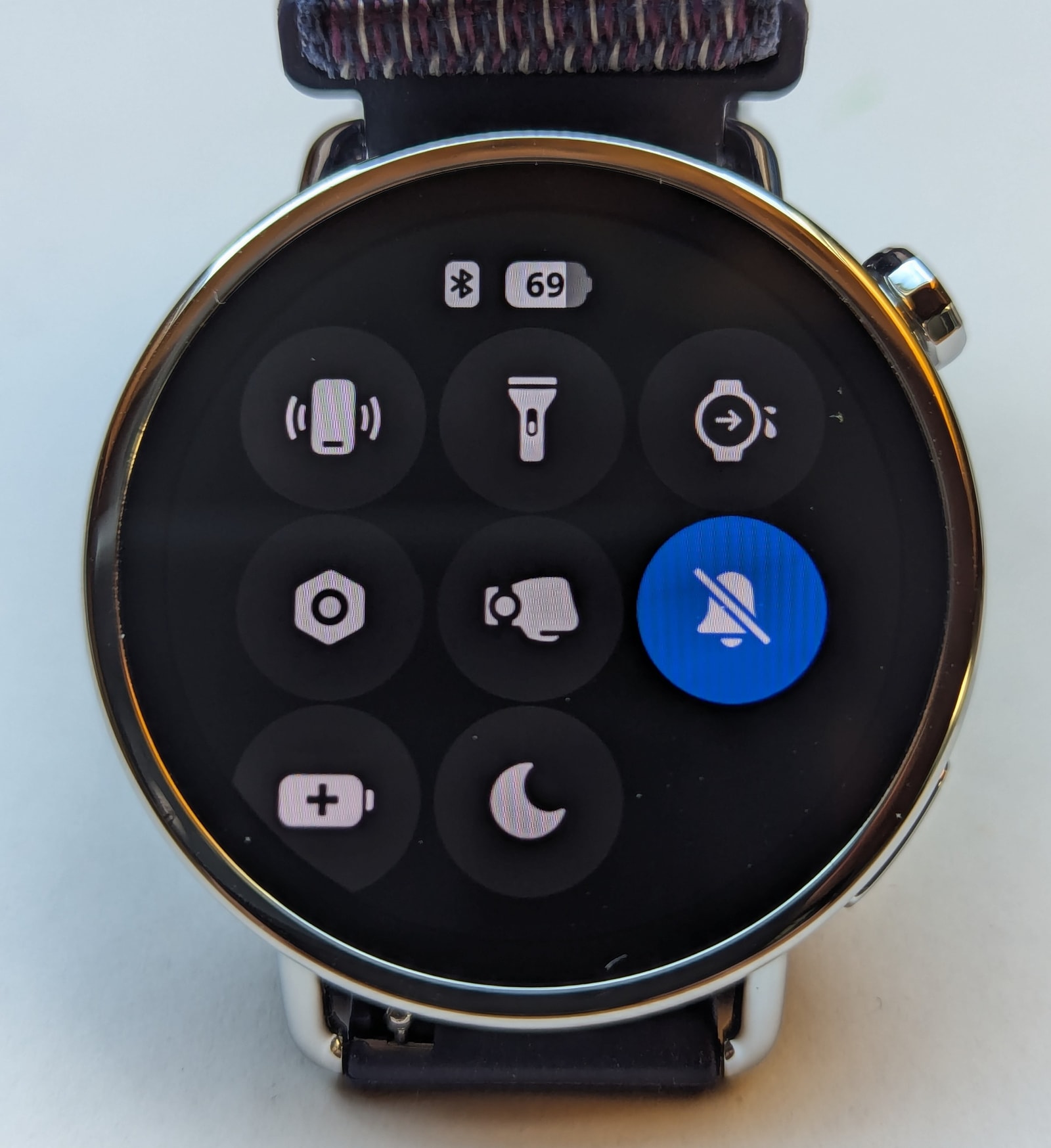
- Secondary button: From anywhere on the watch’s UI, it actually opens the quick settings menu - this was a surprise as it goes against pretty much every other smartwatch system I’ve used, but I’ve come to appreciate the convenience of it, as clicking physical buttons is always faster than activating the watch face and swiping around.
Watch faces and AOD
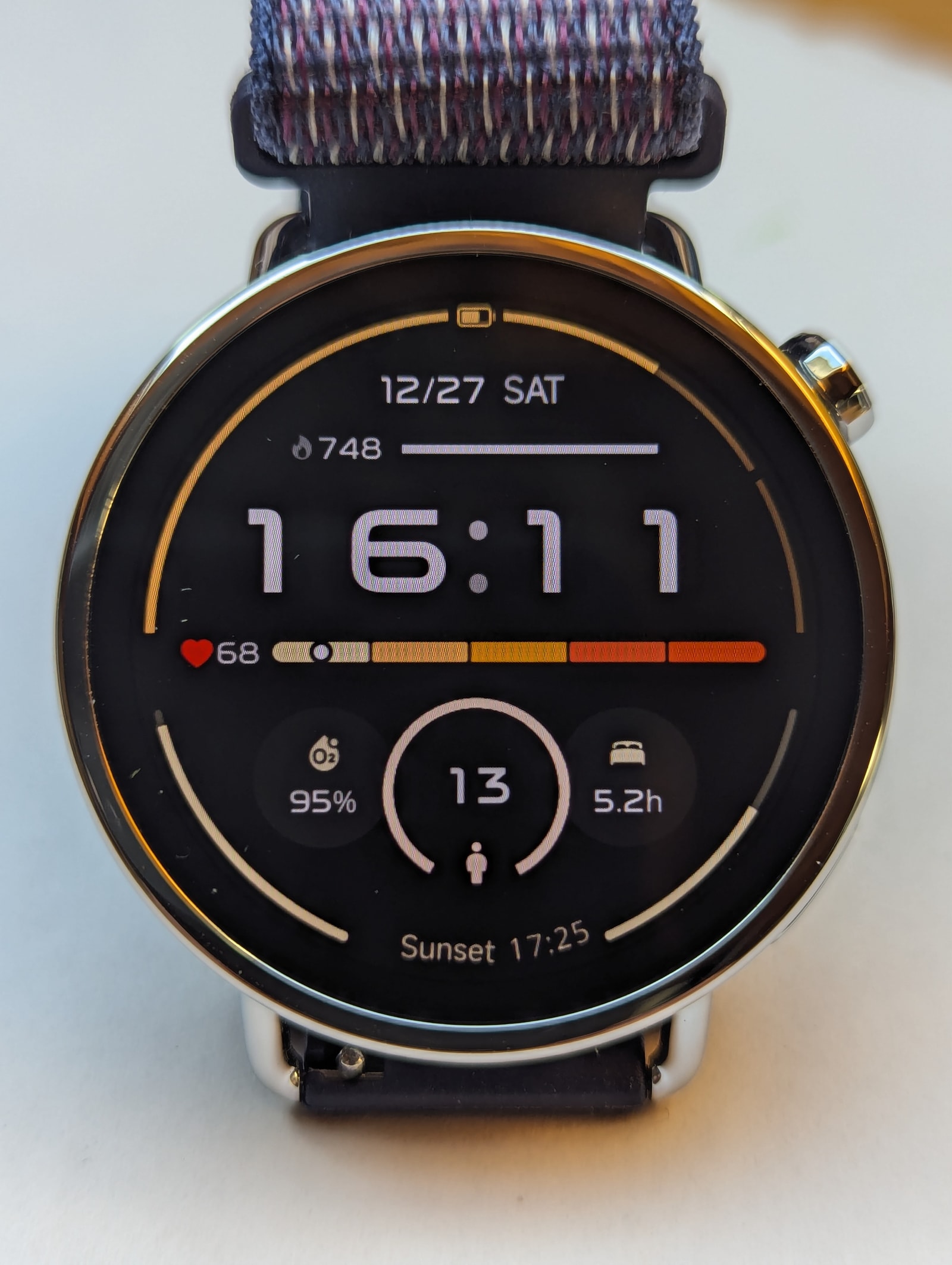
The watch includes 10 preinstalled watch faces, most of which are quite basic. However, this isn’t an issue; you can delete them all if you wish - which you might want to do, as storage is limited to 32 items. The Mi Fitness app offers a massive library of alternatives, so you’re bound to find something you like. As far as I can tell, every watch face in the store includes a suitable AOD mode.
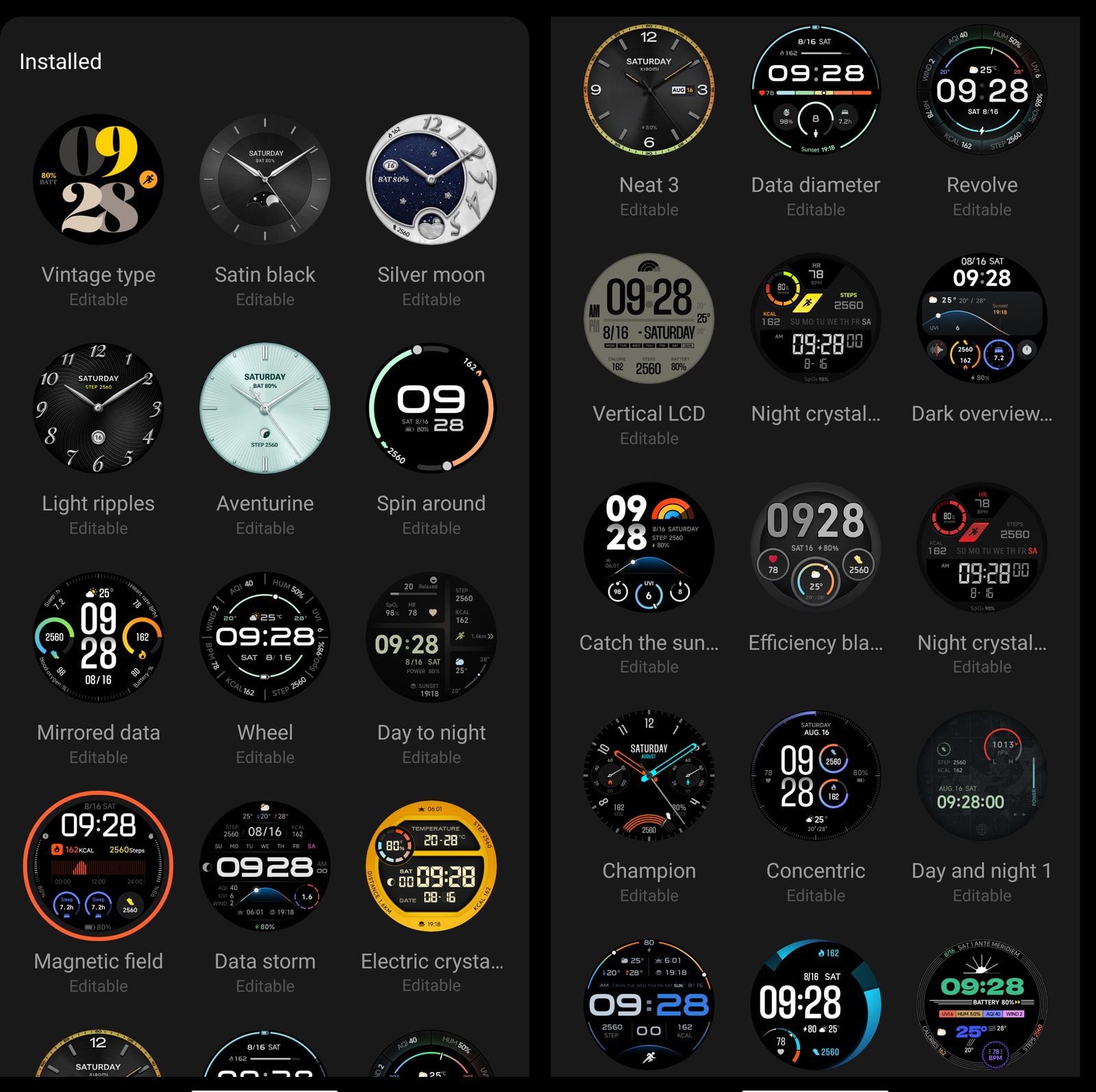
Many of these watch faces are editable, allowing you to change complication widgets or colour schemes. You’re really spoilt for choice here.
When it comes to interacting with watch faces, there are two main actions:
- Swiping left from the watch face: This opens the watch face selection menu, featuring a crescent moon on the right side of the previews. It’s a smooth way to choose faces, especially when using the crown to scroll, and I personally really like it. Note that it’s not possible to access customisation options for individual faces from this menu.
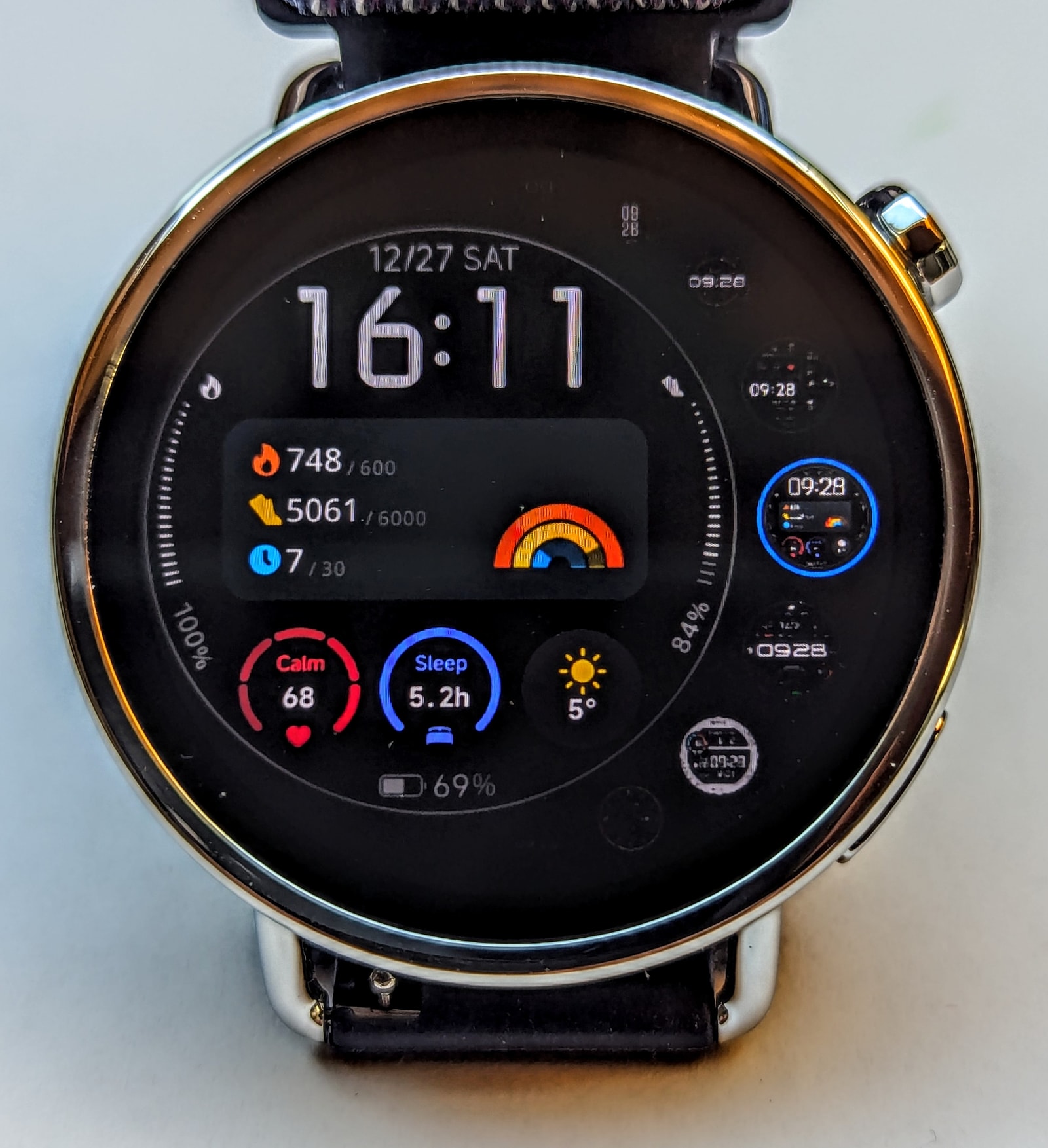
- Long-tapping the watch face: This brings up a more traditional horizontal scroll menu. From here, you can select a face and, crucially, access the “edit” buttons for any available personalisation options.
Battery Life and Charging
Xiaomi advertises the watch, which has a 320mAh battery, to have an 8-day “light usage” battery life, but this is on the extremely optimistic side. I wore it over several charge cycles, testing different power-demanding scenarios related to screen-on duration. The baseline usage is three workouts per week plus about four hours of GNSS-tracked walks per week, with heart rate monitoring set to “Smart” and every other monitoring system (SpO2, stress, advanced sleep tracking, etc.) enabled:
- AOD enabled: 2 days
- AOD disabled + raise-to-wake enabled (my preference): 4 days
- AOD disabled + raise-to-wake disabled: 6 days
Normally, my preference is to wear large, chunky watches with big batteries that offer at least a week (for the budget segment) or more of battery life with AOD disabled and raise-to-wake enabled. But honestly, four days of battery life is more than enough for most people, and I didn’t find it particularly tedious to keep up with.
The charger has very strong magnets and attaches securely to the watch, being more of a cradle than a simple charging cable. You can charge the watch from 10% to full in about 35 minutes.
Health Monitoring
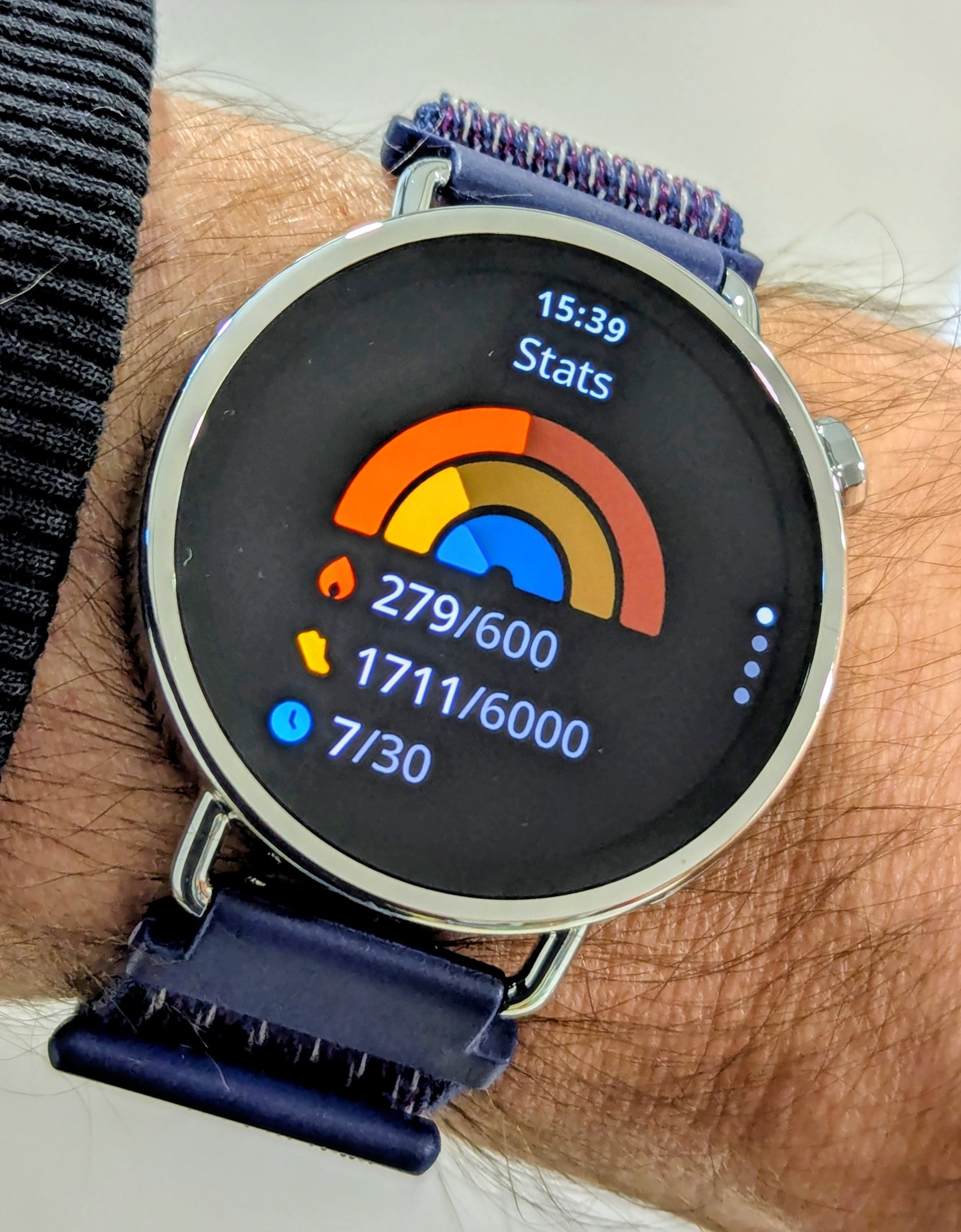
The Xiaomi Watch S4 41mm features a comprehensive suite of health monitoring metrics, including heart rate tracking, blood oxygen monitoring, sleep tracking, breathing exercises, and menstrual cycle tracking. The Mi Fitness app allows you to set goals for steps, active calories, and active time, which are displayed prominently on both the watch and in the app:
Heart rate and SpO2
The watch is equipped with a 4-LED, 4-PD (photodiode) PPG heart rate sensor. The sensor is fairly accurate, quickly locking onto a heart rate reading after a brief period of initial calibration.
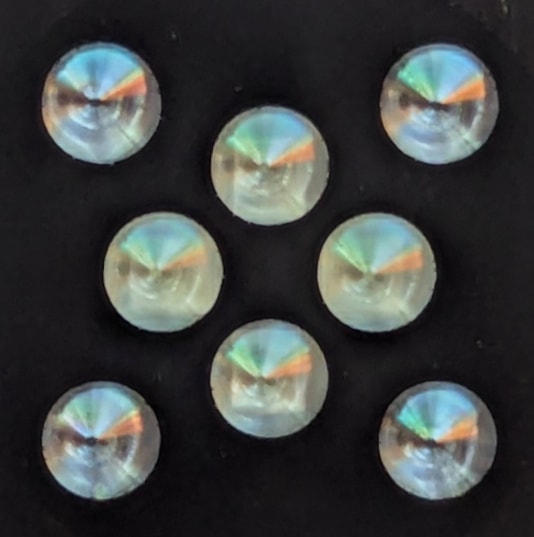
For background heart rate monitoring, the watch allows for periodic sampling every 1, 5, 10, or 30 minutes. It also includes a “Smart” setting that measures more frequently when the watch detects you are active.
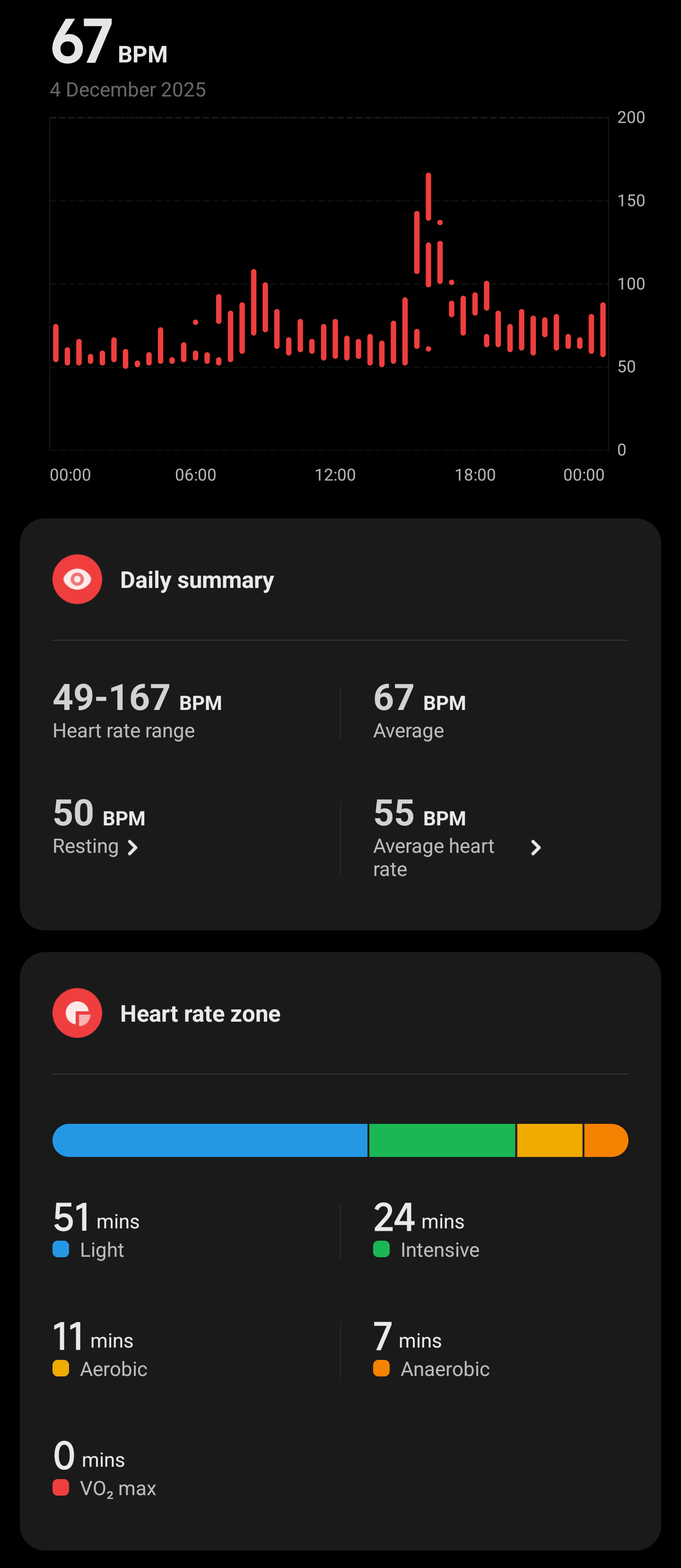
It offers a good range of different metrics, particularly RHR (resting heart rate), daily average, and sleep average (confusingly labelled “Average heart rate” in the app). It’s a bit disappointing that HRV (heart rate variability) is not available as a standalone stat, as the sensor is certainly of high enough quality to offer meaningful insights. Interestingly, the stress monitoring section of the app mentions using HRV to assess stress, so it’s puzzling why it isn’t offered as its own metric.
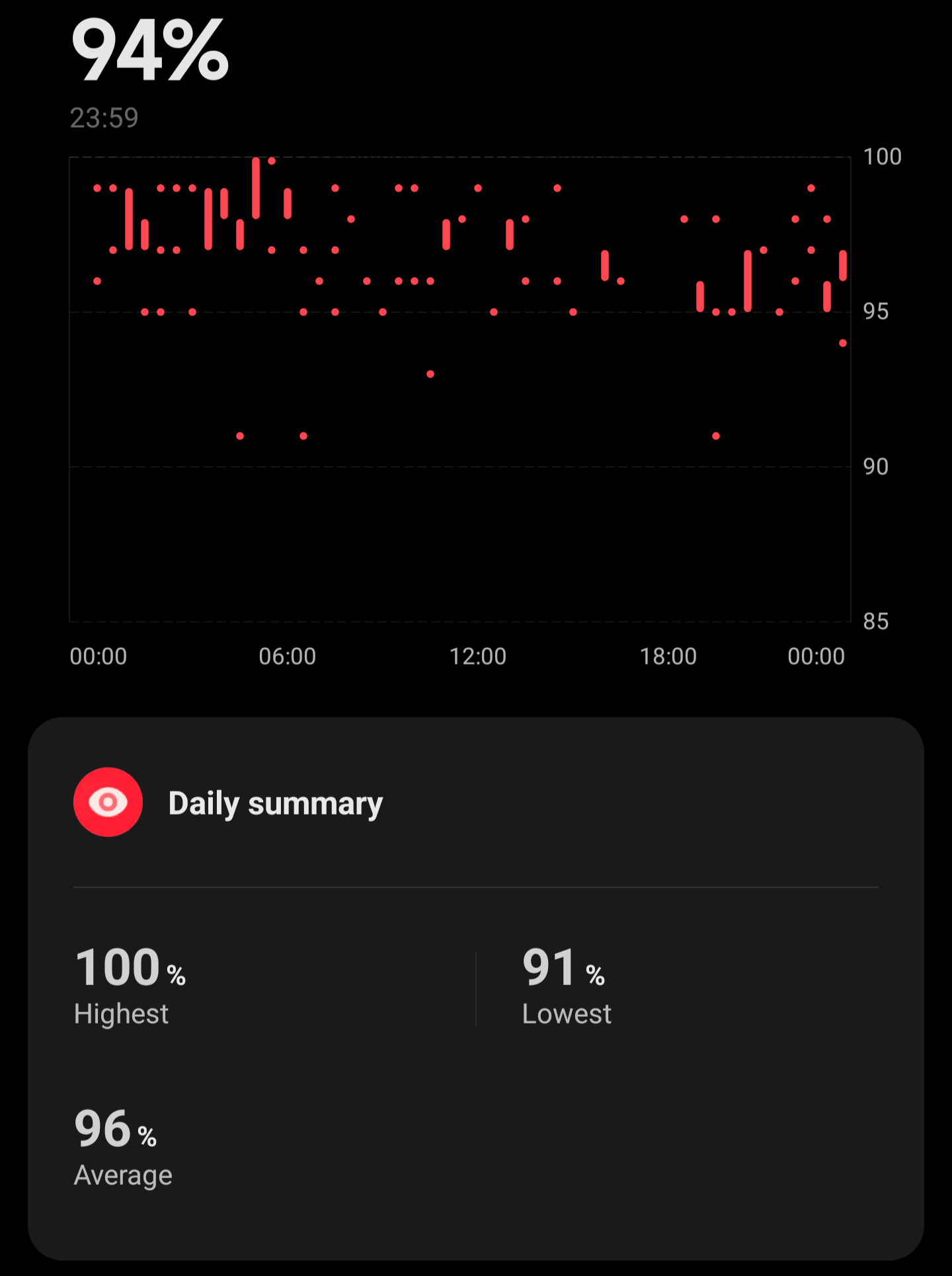
Blood oxygen saturation (SpO2) monitoring is also available, providing daily data to accompany your heart rate trends.
Sleep tracking
When it comes to sleep tracking, the watch accurately detects sleep, wake-up times, and naps. It offers a good amount of data for each session, including heart rate and oxygen saturation.
However, sleep stage detection had a tendency to significantly overestimate deep sleep stages. For example, consider this sleep session I logged on both the Xiaomi watch and a Pixel Watch 2 (Fitbit devices are currently considered some of the top sleep trackers):
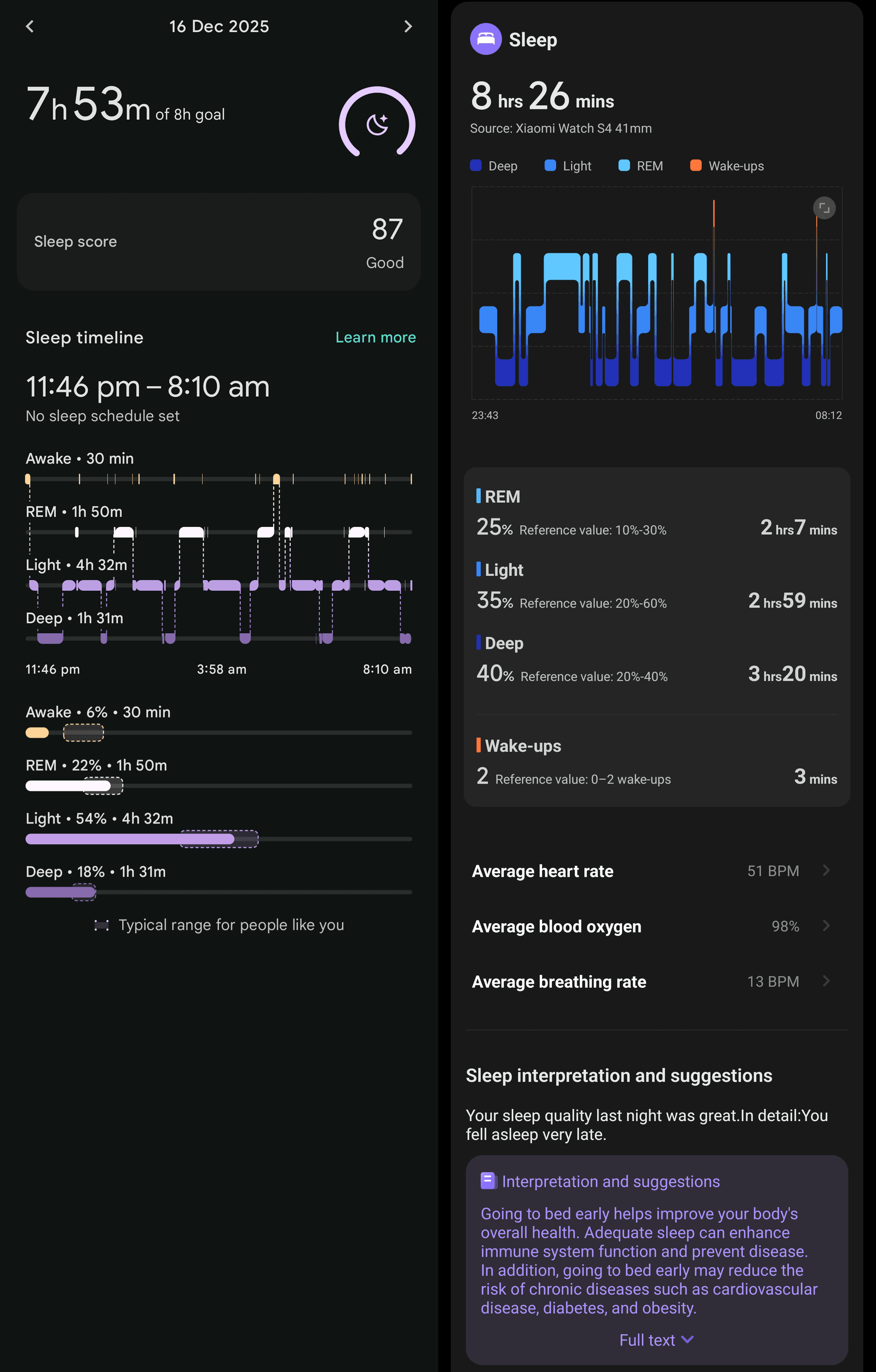
The watch detected awake moments well, and REM sleep duration was comparable. However, when it comes to light and deep sleep, the watch appears to misclassify a lot of light sleep as deep sleep. This is a shame, as deep sleep is a key metric for gauging sleep quality. There was also considerable “jitter,” with the watch frequently flicking between stages in short periods. While the reference device isn’t a gold standard, the discrepancy is still worth noting.
Stress and temperature monitoring
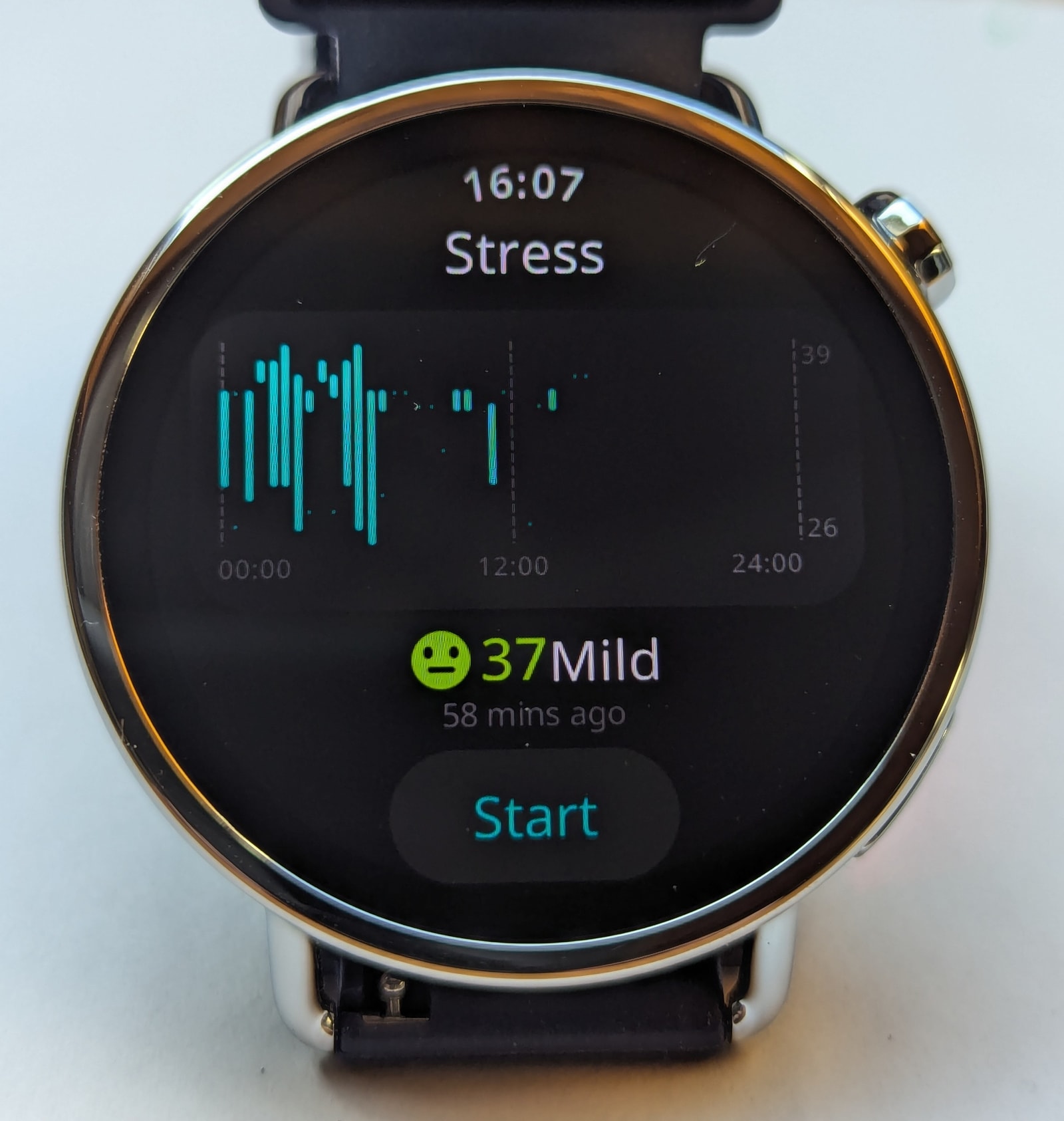
The watch also offers stress monitoring, which uses HRV to assess stress levels. It’s difficult to gauge exactly how effective this is, as I’m usually quite a chilled individual, so I’ll leave it to the reader to judge.
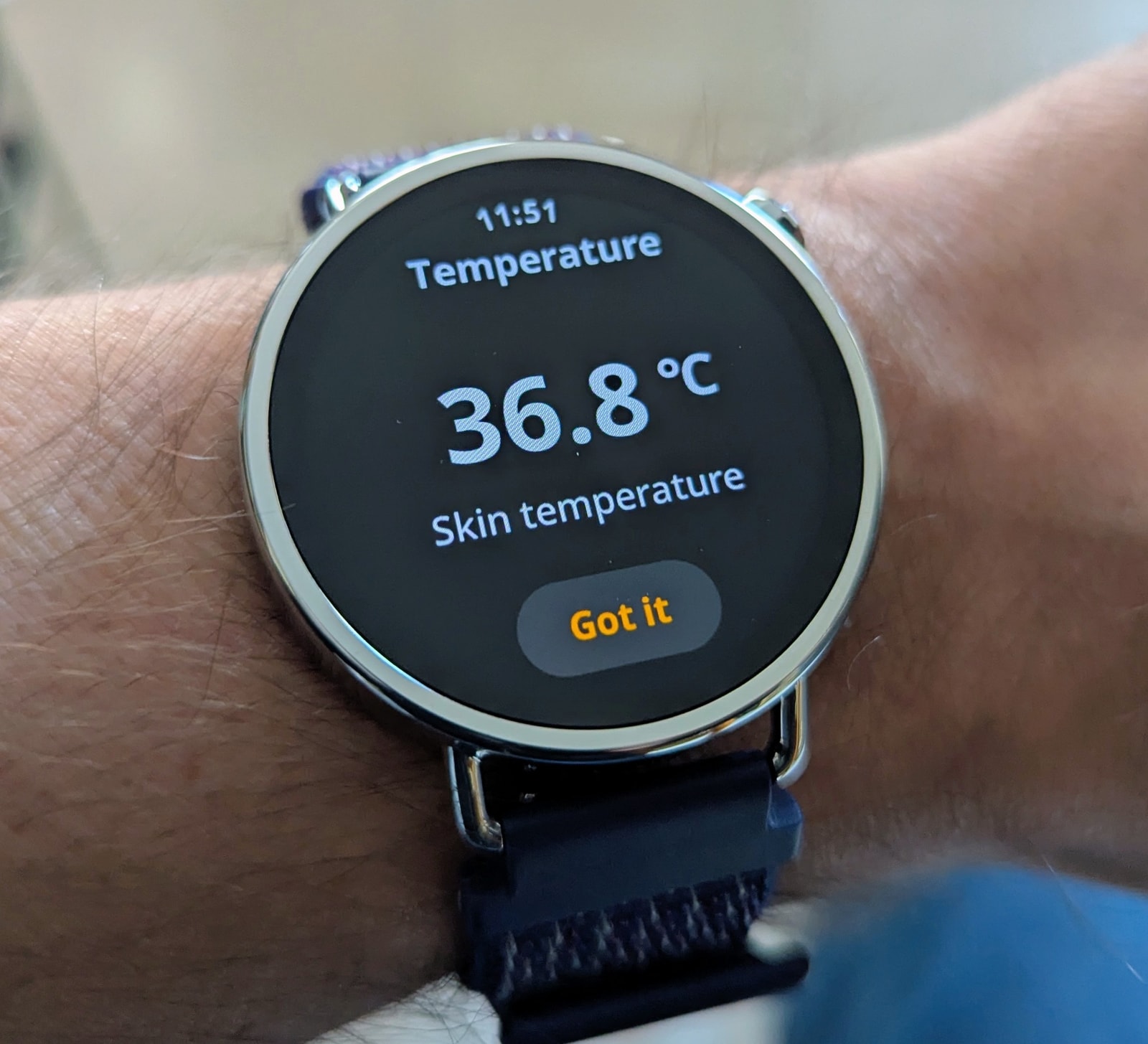
The watch is also fitted with a temperature sensor. It requires you to wear the watch until it reaches your skin temperature before it can take a measurement. It seems to be fairly accurate, using a bit of “math black magic” to translate skin temperature into an estimated body temperature. Curiously, although there is a setting to monitor temperature during sleep, only manual measurements were ever recorded. This may be a bug in the firmware.
Fitness and Outdoor Features
Sports modes
The watch supports roughly 150 sports modes, covering everything from running and cycling to more niche activities. Marketing materials highlight swimming, and the device is rated 5 ATM.
The promotional content emphasizes the watch’s suitability for swimming, specifically the heart rate sensor’s ability to track performance in the water. I am not a swimmer, so I haven’t been able to test this myself. It’s important to bear in mind that water resistance in electronics is always temporary; eventually, the waterproof seals will degrade.
GNSS tracking
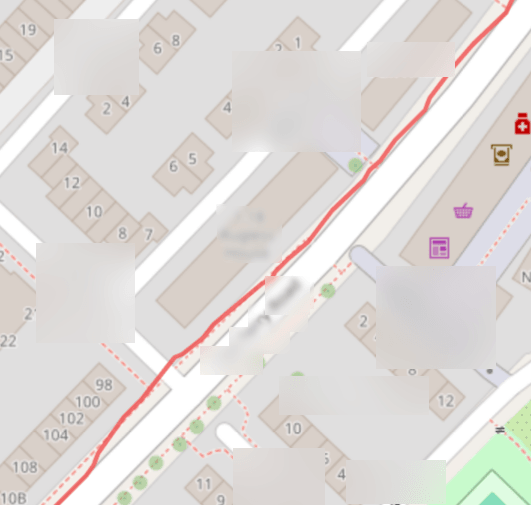
GNSS tracking, unfortunately, is not a strong point for this watch. It’s functional, but it struggled in urban environments. If A-GNSS hasn’t been recently provisioned by the Mi Fitness app, obtaining an initial fix can take some time.
Consider the following route in a built-up area of my home city:
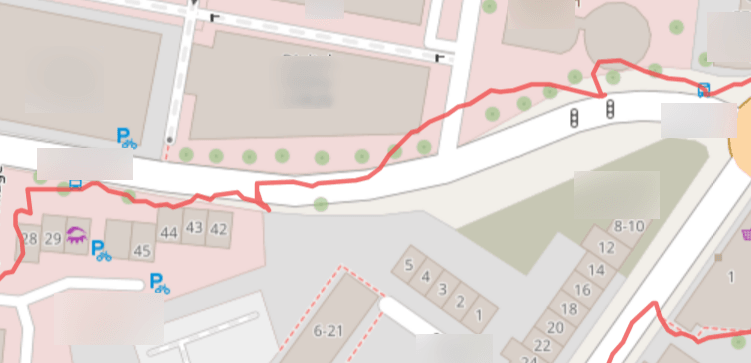
This particular area is challenging for GNSS systems as it’s essentially a city canyon; I’m showing a worst-case scenario here. The track is indeed quite wobbly, with some backtracking and drift. This can be problematic if you’re a runner and depend on accurate distance for pace and speed, as the watch has a tendency to overestimate distances due to the wobble.
I suspect the issue here, given the dual-band nature of the GNSS tracking system, is simply that it’s a small watch with a small GNSS antenna. I’ve observed similar problems on other compact devices, like the recently reviewed DM76.
On less built-up areas of the city, the tracking was absolutely fine, though:
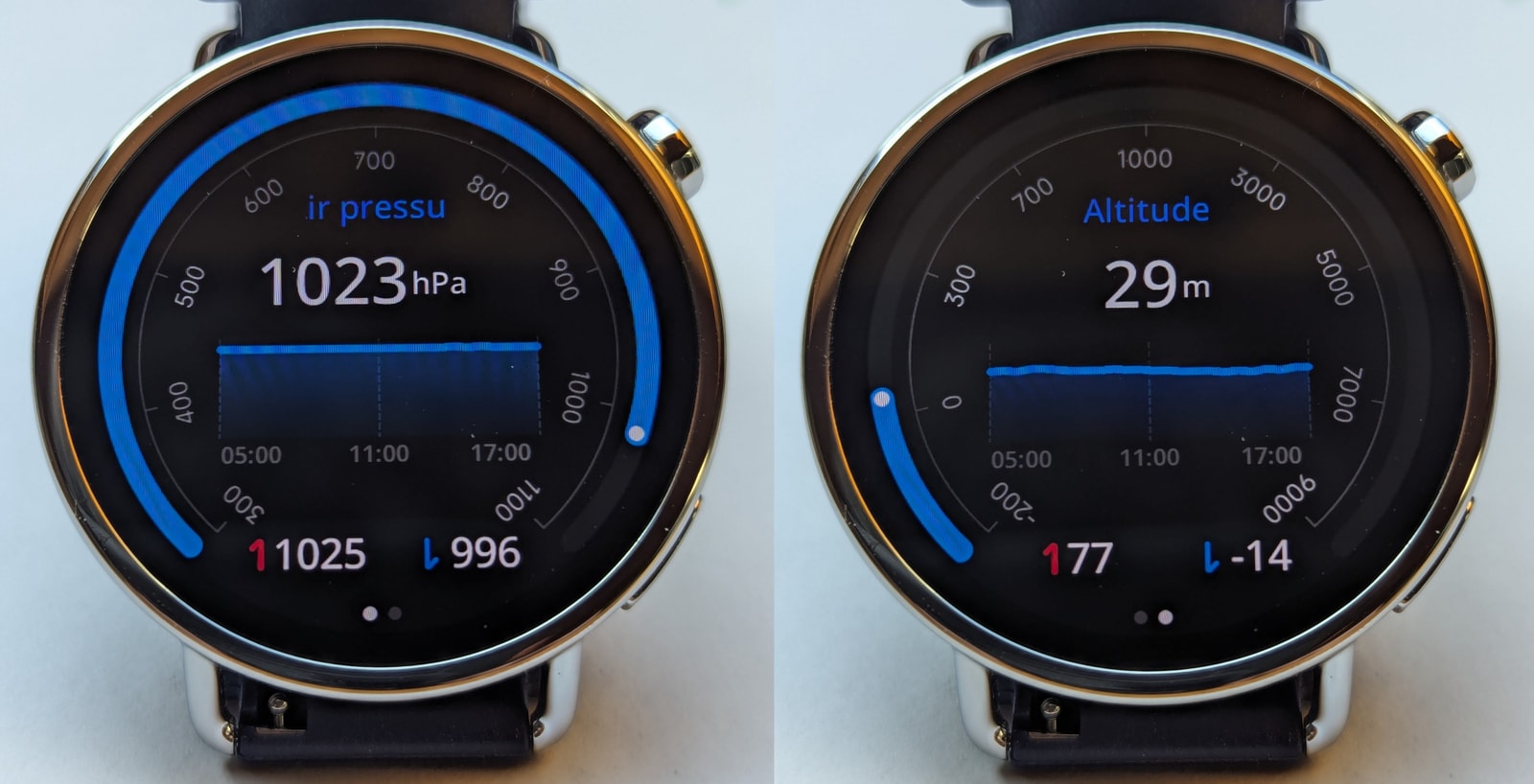
Alongside GNSS, there’s a barometric altimeter - useful for the outdoors, but with the usual caveats. Air pressure changes with the weather, so readings can drift; don’t rely on it heavily. It can self-calibrate either manually after a GNSS lock or automatically during GNSS-tracked activities. Accuracy is decent but not perfect; however, this is not the kind of watch you’d take on a mountain hike where altitude data is critical. There are no severe weather alerts tied to sudden drops in air pressure, but this isn’t really an “adventure” watch. Still, it would have been a thoughtful little feature to include.
There’s also a compass, which is handy for navigation. It calibrates quickly with a figure-eight motion and stays calibrated for quite a while. In addition to the dedicated compass app, it’s available in the track view during GNSS-tracked activities for better route context.
Step counter
During activities, I found the step counter to be accurate and broadly in line with my comparison devices, so there’s nothing to complain about here. However, the watch does have a tendency to overcount steps when you’re at home, simply from moving your hands. I would recommend not wearing this watch on your dominant hand to keep the step counting more honest.
Sports tracking and tests
I wore this watch for about three weeks, occasionally alongside my Pixel Watch 2 and Amazfit T-Rex 3 Pro, to capture comparative data. Both of those devices feature solid sensors and activity tracking. I logged every walk and workout - including hiking, elliptical sessions, and strength training - then selected a few representative sessions for this review, favouring those that were less than perfect.
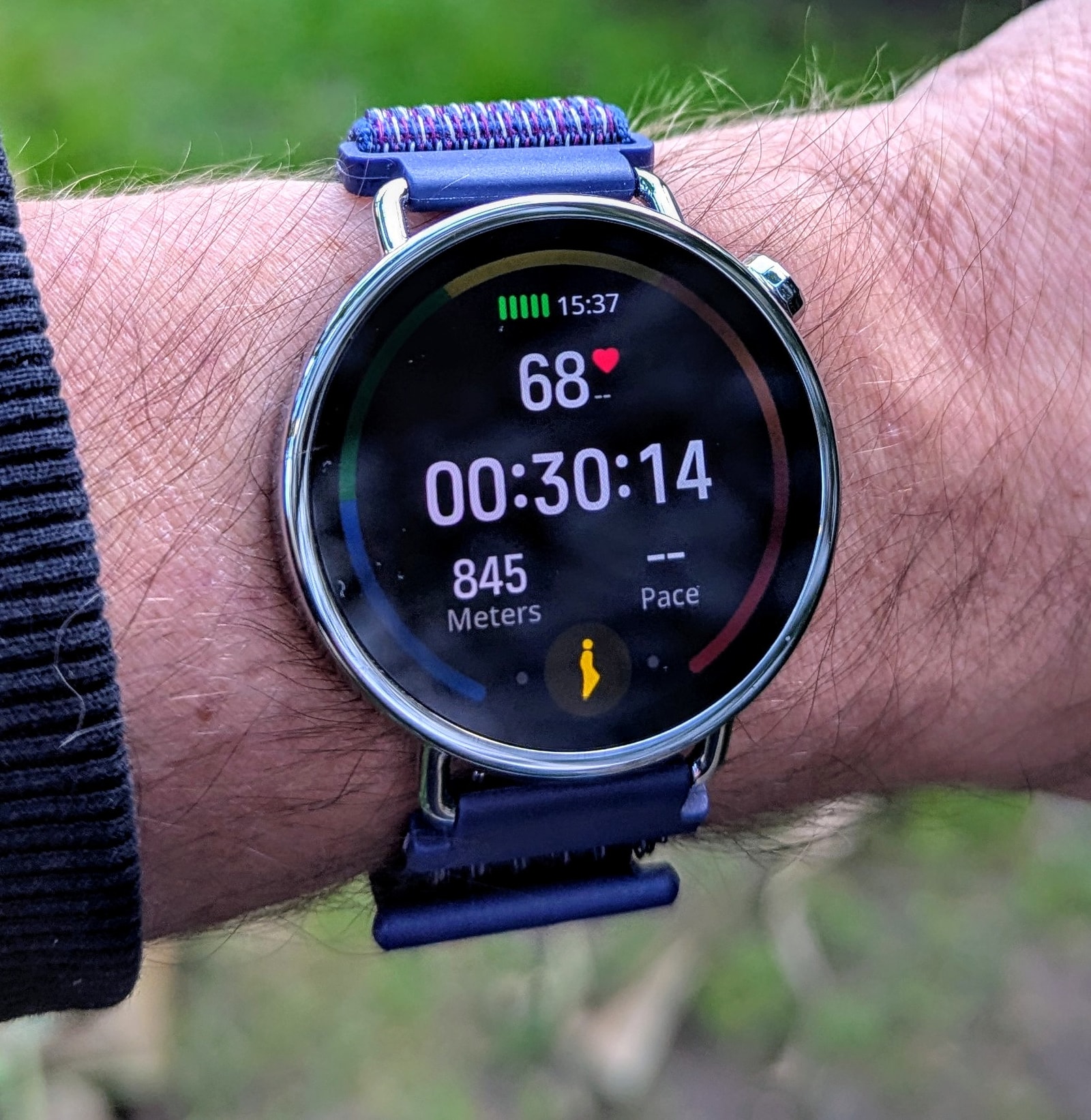
To cut a long story short, the watch performed well across all three activities I usually track, with one caveat: on the elliptical trainer, there was some evidence of cadence lock. Otherwise, heart rate and statistics were usually spot on and comparable to the two more expensive devices I used for comparison.
Note: The Mi Fitness app has limitations when exporting workouts to TCX files - specifically, heart rate data is not included. To work around this, I had to capture heart rate data from the Strava website’s graphs. Since these don’t include timestamps, the resulting graphs might be slightly offset in a way I cannot easily correct.
GNSS-tracked outdoor walk
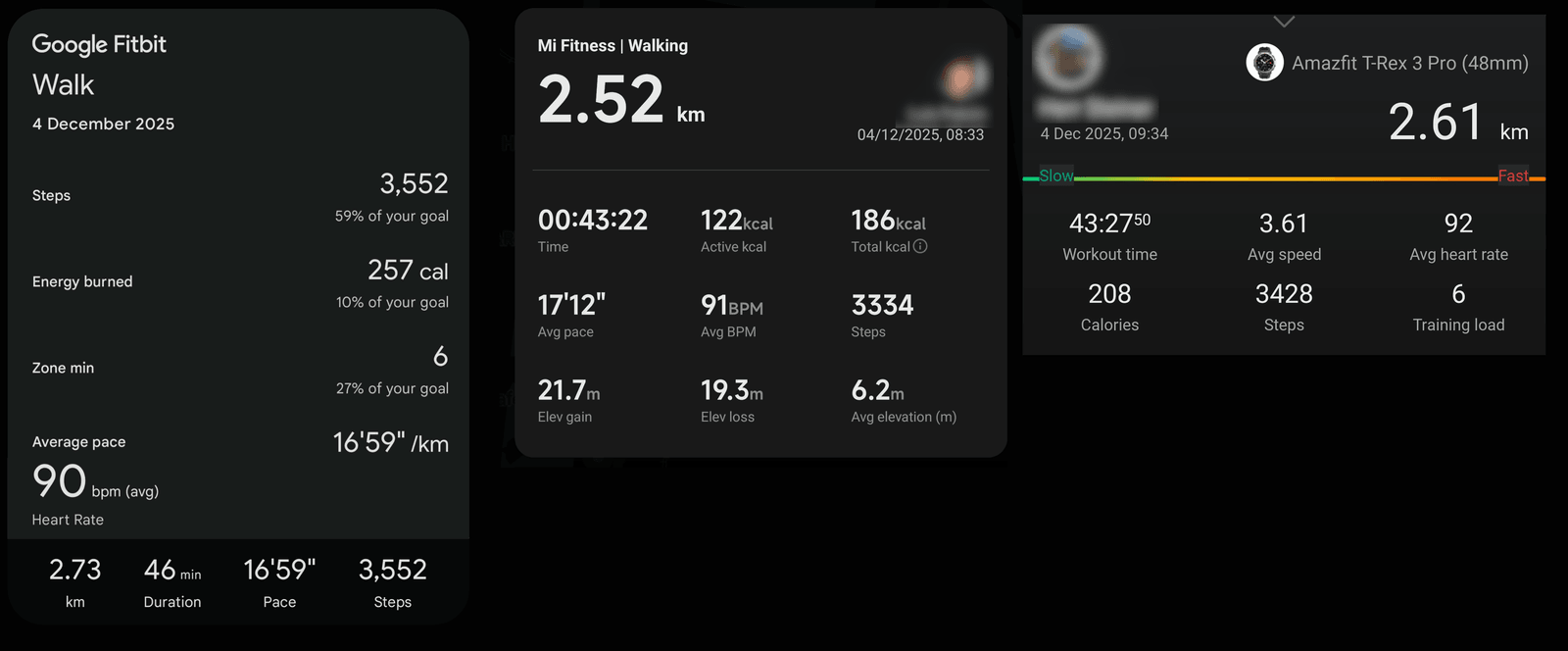
Here is one of many outdoor walks I logged using this watch and my two comparison devices.
I have already detailed the quality of the GNSS tracking and barometric altimeter in the previous section, so I will not repeat those points here.
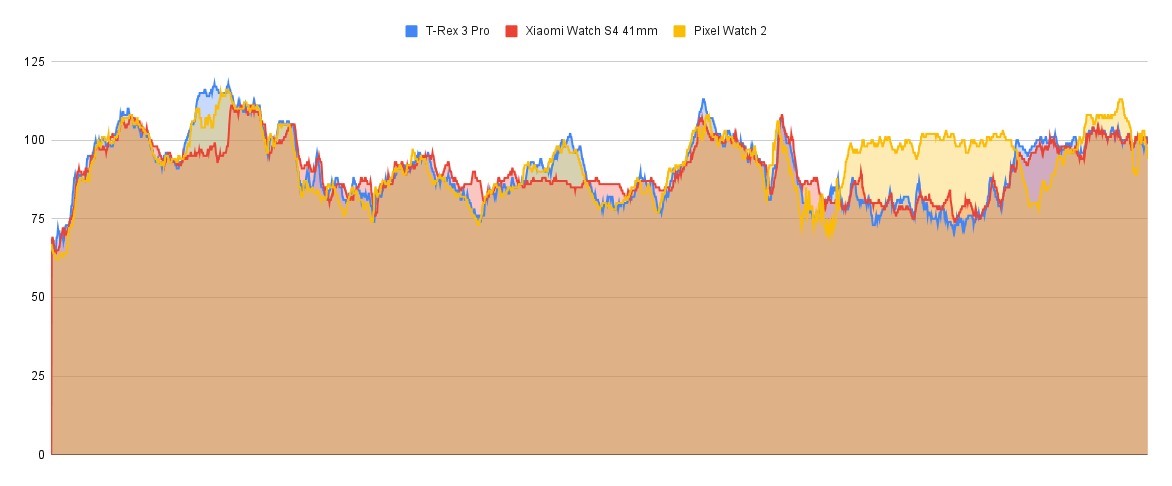
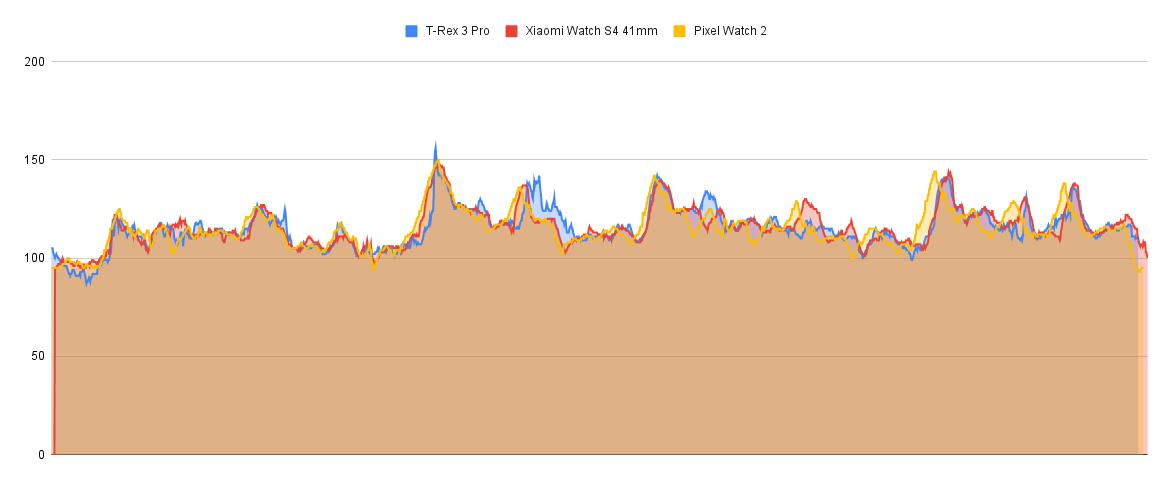
When it comes to heart rate, the watches show a high degree of agreement, except for the Pixel Watch 2, which seemed to lose its way for a bit towards the end of this particular activity. There were a couple of heart rate peaks that the Xiaomi watch either missed or caught up to late at the beginning and middle, but overall, the results are quite solid.
Activity statistics are also broadly in line. There is some disagreement on step counts, likely because I wore three devices on two arms, with one at a different height, but other metrics like calorie burn all fall within the same reasonable ballpark. Distance, however, is slightly off - the T-Rex 3 Pro measured 2.61 km, a 90m difference no doubt caused by the urban GNSS inaccuracies mentioned earlier.
Strength training
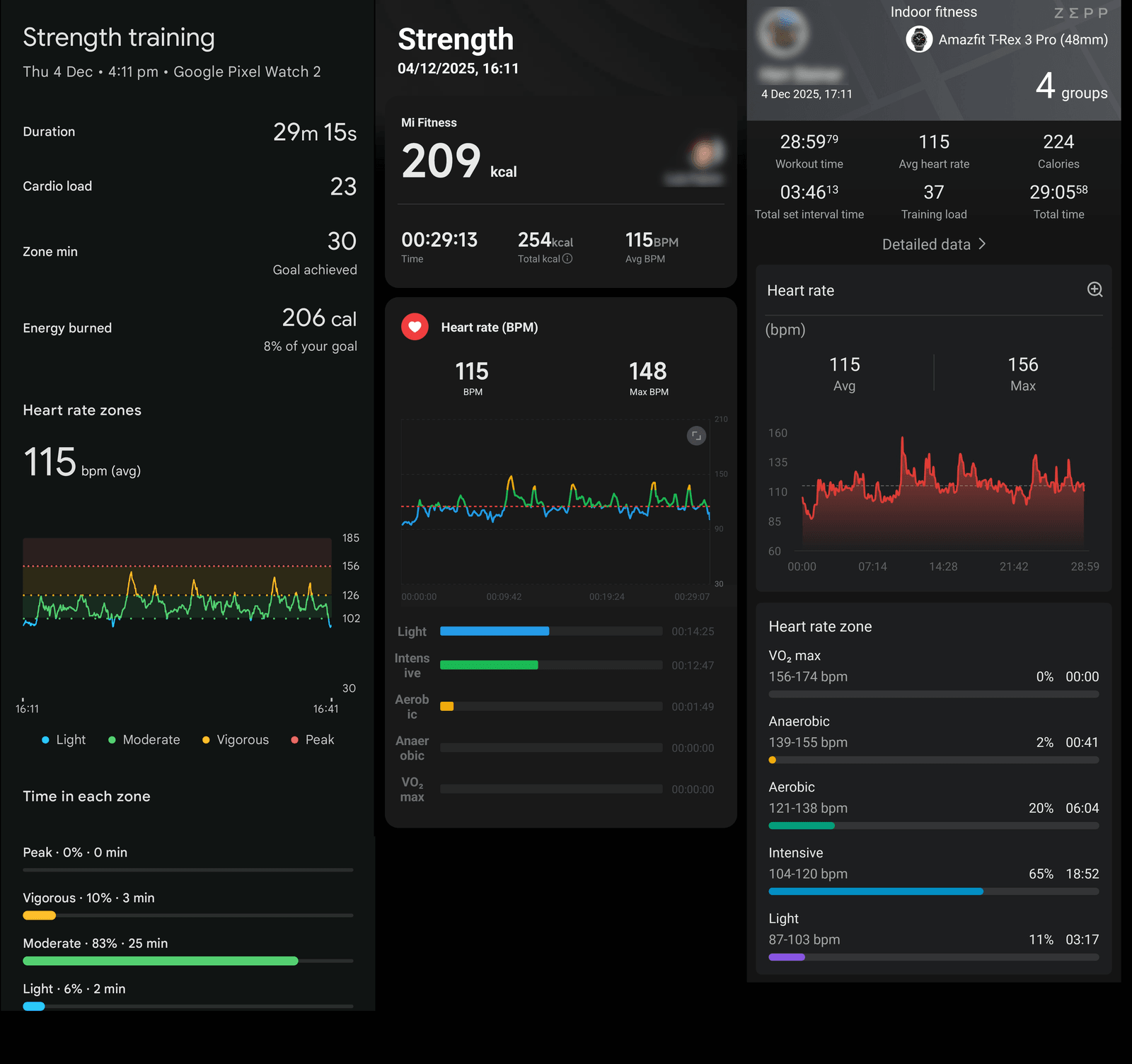
The heart rate sensor on the Xiaomi watch really delivers here. It is excellent at matching, and in some cases even surpassing, the other devices in capturing the heart rate peaks typical of this activity. While a chest strap remains the best choice for this kind of workout, the Xiaomi watch does an admirable job.
Other statistics, such as heart rate zones and calories, were virtually equivalent across all three devices, and again, the Xiaomi watch performed very well.
Elliptical crosstrainer
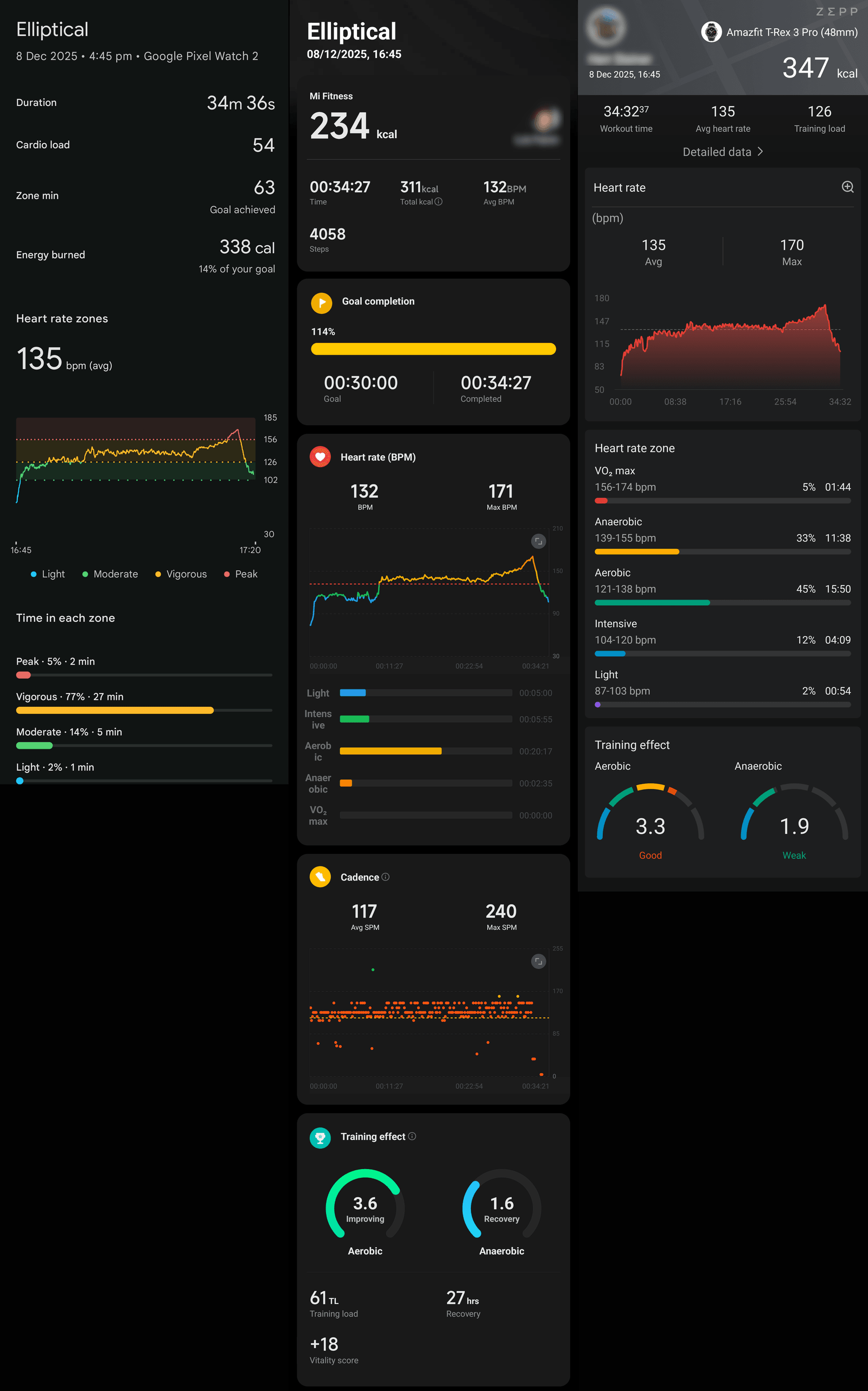
This activity proved to be a bit of a mixed bag. On a couple of occasions, the watch under-reported my heart rate for a while, but only during elliptical workouts. I suspect this is due to a form of cadence lock that the watch is particularly prone to during this specific activity. It is somewhat puzzling, as the elliptical is generally a straightforward activity to track, even with the arm movement involved.
This was the worst case I observed:
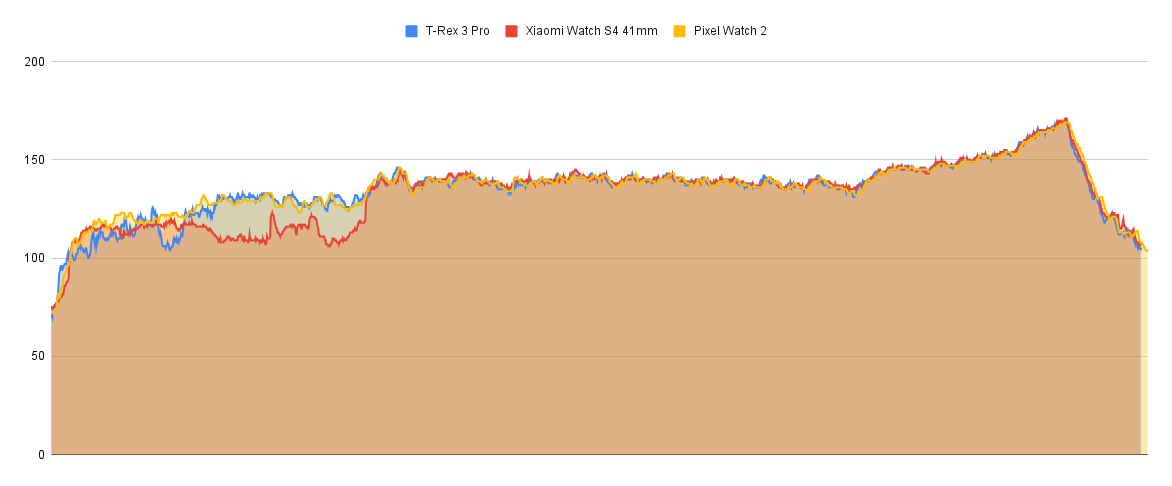
The Xiaomi watch became confused for a few minutes at the start and misread my heart rate. Judging by when it corrected itself, it did so just after I finished my warm-up and increased the intensity. Perhaps the movement of my hands while adjusting the machine’s controls was enough to kick it back into gear. Regardless, once it picked up, the results were spot on.
Regarding the statistics, the Xiaomi watch was in the same ballpark as the other comparison devices for all metrics.
Smartwatch Features
As a smartwatch, the Xiaomi Watch S4 41mm handles notification mirroring, music controls, weather, and a handful of basic apps. Notifications display cleanly enough, though interaction is limited.
Key features include:
-
Notifications/messages: The watch does a good job mirroring notifications from the phone; in particular, it is capable of dismissing notifications from the phone when you dismiss them on the watch, which is actually quite useful. Unfortunately, there are some really confusing limitations you need to be aware of:
- No emoji support
- No ability to respond to messages
-
Alarms: These are set directly on the watch and work reliably. The audio alarm can get pretty loud, and I’d wager the vibration is enough to wake most people up.
-
Timers: You can leave timers running in the background, and you can easily return to them via a floating action on the watch face if you navigate away from the app.
-
Bluetooth calling: No issues here. The speaker and mic are clear; callers heard me well and I could hear them just fine. It worked impeccably.
-
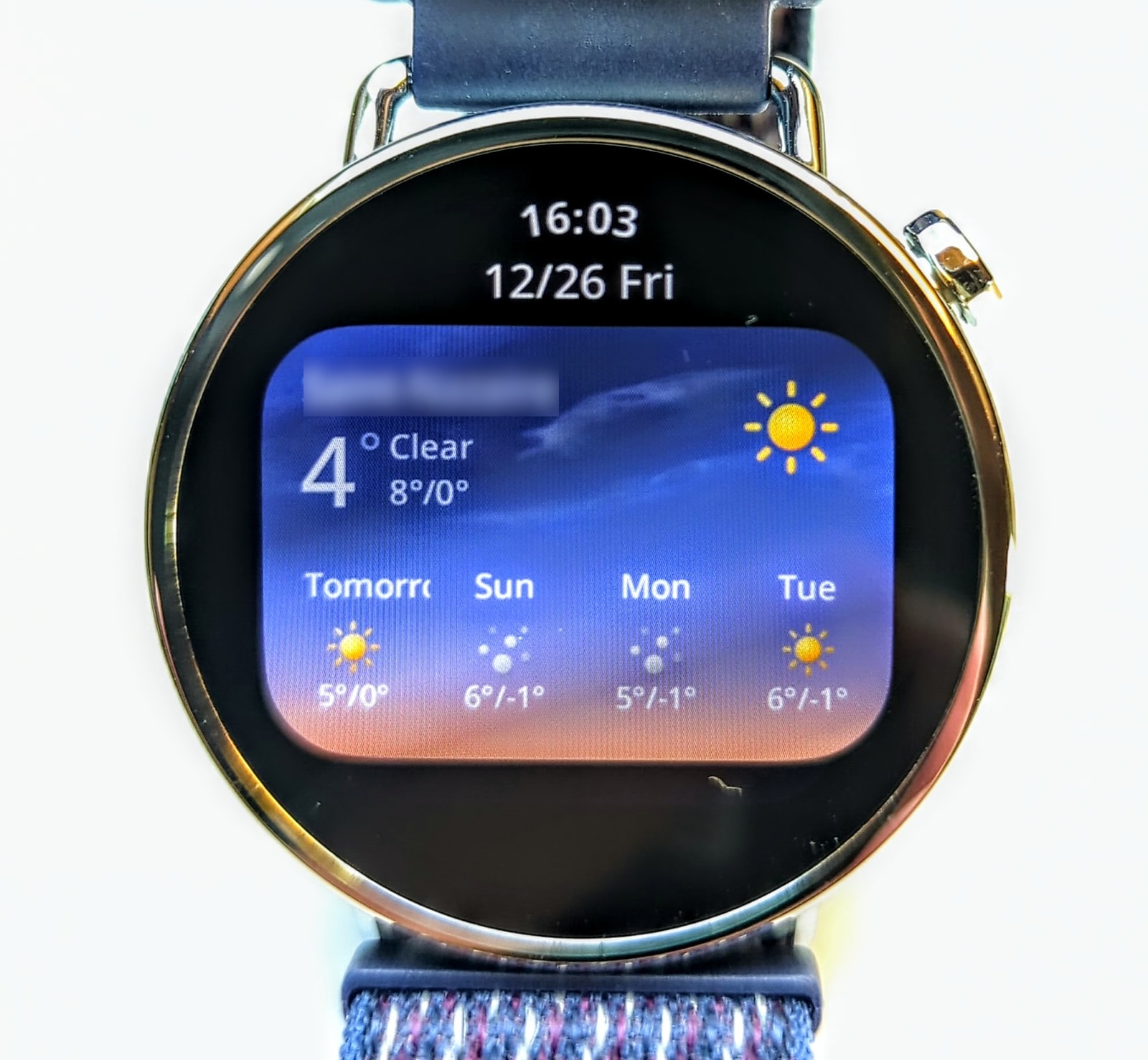
Weather: The weather app is disappointing. You get current conditions and a four-day forecast, as well as a nice graph showing the progress of the sun in the sky, but there’s no information on UVI or wind speed, and no hour-by-hour forecast for the current day.
-
Find my phone/watch: This works both ways. The range covered my entire home, and it worked perfectly.
-
NFC / Payments: Unfortunately, I have been unable to test this feature as, for some reason, I’m unable to get a Curve account, and it is the only provider available in my country that works with Xiaomi Pay. Much like Amazfit, Xiaomi has put all its eggs in the same basket; if you have trouble signing up for a Curve account (as the Curve subreddit suggests is very common), you’re stuck.
The app: Mi Fitness
I’m not going to go into a great deal of detail here: the app is great. It’s nicely laid out, visually appealing, has a dark mode, and is very pleasant to navigate. Stats are presented clearly, and all the health and workout data is easily accessible and easy to read.
When it comes to watch management, the app also performs well. It’s very similar to most other companion apps out there; if you’ve used any smartwatches before, you’ll have no trouble navigating or installing watch faces.
However, the workout history export functionality is quite buggy - a lot of data is missing, such as heart rate graphing. While this might not matter to most people, it unfortunately also affects the Strava integration, which is lacklustre.
On the plus side, notifications and connectivity were reliable; I never experienced any delayed responses or issues connecting and syncing with the app.
All in all, it’s a solid app - well-designed and easy to use.
Conclusion
The Xiaomi Watch S4 41mm is an impressive piece of hardware that successfully balances a high-end aesthetic with a competitive price point. Its polished stainless steel body and vibrant AMOLED display create a premium feel that belies its roughly £130 asking price. This is further enhanced by HyperOS 3, which provides a fluid and responsive user experience that rivals more expensive competitors.
Beyond its design, the watch delivers respectable performance in health tracking, with the heart rate sensor proving particularly reliable during high-intensity workouts. However, it is not without its limitations. The GNSS tracking can struggle with precision in dense urban environments, and the sleep tracking tends to overstate deep sleep duration. Furthermore, the smartwatch functionality remains somewhat basic; the lack of emoji support in notifications and a restrictive payment ecosystem are notable omissions for a device in 2026.
In summary, the Xiaomi Watch S4 41mm is an excellent choice for those who prioritise style and a sophisticated interface. While it may not satisfy the demands of power users or hardcore athletes who require pinpoint GPS accuracy and deep notification integration, it stands as a compelling and well-rounded option for anyone seeking a stylish, high-quality wearable that handles the essentials with confidence.